
A stalled approval flow usually doesn’t look strategic at first. It looks like invoices waiting in someone’s inbox, customer records copied by hand between systems, support tickets bouncing across teams, and a backlog of “small” requests piling up behind larger IT priorities.
That’s where many CTOs, COOs, and founders are right now. The business wants faster execution. Operations wants consistency. IT wants control. Everyone wants lower cost and fewer manual errors, but the existing delivery model can’t keep up.
A no code automation platform changes that operating model. It gives business teams a controlled way to automate repetitive work without waiting for a full custom development cycle, while IT retains oversight over security, architecture, and integration standards. Used well, it becomes a speed layer across the business. Used poorly, it becomes shadow IT with prettier screens.
The difference isn’t the tool. It’s the adoption model.
The End of Workflow Bottlenecks
Most enterprises don’t suffer from a lack of ideas. They suffer from execution drag.
A finance lead wants invoice data to sync automatically into a reporting system. Sales wants leads routed the moment a form is submitted. Operations wants alerts when a fulfillment exception appears. None of these requests are massive on their own, but together they create a queue that pulls engineering attention away from core product, security work, infrastructure, and modernization.
That queue gets expensive fast.
Where the bottleneck really sits
The problem usually isn’t that teams don’t understand their workflows. They understand them well. The problem is that the people closest to the process often can’t implement the fix themselves.
A no code automation platform addresses that gap by letting business users configure workflows through visual tools, templates, and app connectors. IT still matters. In fact, IT matters more, because someone needs to define guardrails, approve data access patterns, and decide which automations belong in no-code versus custom systems.
Practical rule: Automate business process friction where the workflow is understood, repeatable, and integration-ready. Don’t start with the messiest process in the company.
That distinction matters. No-code works best when the business process is stable enough to map, but important enough to justify attention.
What a strong starting point looks like
Good first candidates tend to share a few traits:
- High repetition: Teams perform the same task over and over, often with copy-paste work between apps.
- Clear trigger: A form submission, status change, new record, or approval event starts the workflow.
- Visible pain: Delay, inconsistency, or manual rework already affects cost, customer response, or reporting quality.
- Contained scope: The automation can be tested without redesigning the whole enterprise architecture.
For many leadership teams, the first useful exercise is documenting where handoffs fail. That’s often enough to expose a backlog of automation candidates. A practical framework for that assessment appears in Dr3amsystems’ guide on how to streamline business processes.
The key shift is cultural as much as technical. Business teams stop filing tickets for every routine integration need. IT stops acting as the sole builder for every operational improvement. The organization starts treating automation as a managed capability instead of a collection of one-off fixes.
Understanding the No-Code Automation Engine
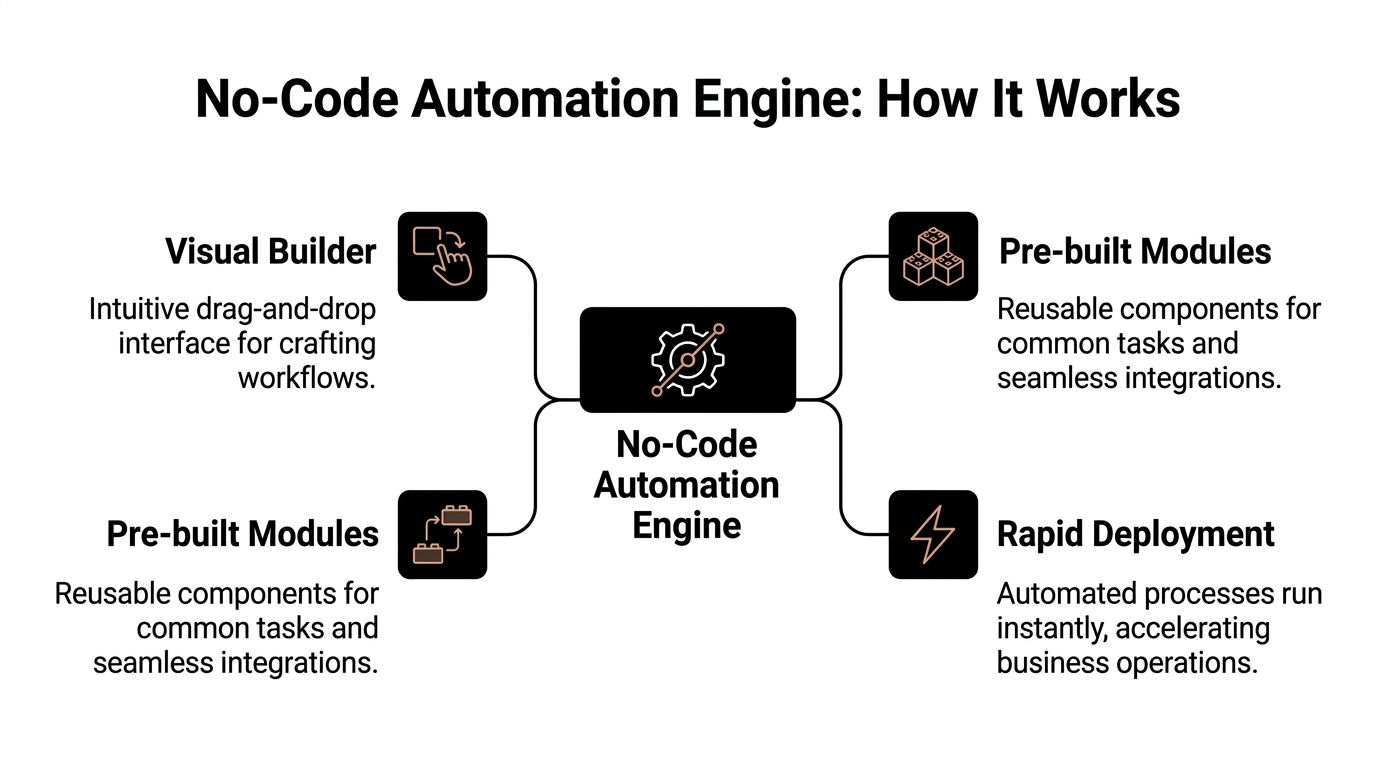
The easiest way to understand a no code automation platform is to think of it as a digital assembly line.
One part watches for an event. Another part moves data. Another part decides what happens next based on rules. Instead of writing code to build each station, users configure the line visually.
The three parts that matter most
Most platforms vary in polish and depth, but the underlying engine usually has three essential layers.
Visual builder
This is the design surface. Users drag steps into a workflow, define conditions, and map fields between systems.
For an executive audience, the value isn’t the drag-and-drop itself. The value is that process owners can see the logic. A workflow becomes inspectable. You can review the trigger, the branches, the approvals, and the outputs without digging through code repositories.
Connectors and reusable modules
These components provide speed.
Instead of building every API integration from scratch, platforms provide connectors to common tools like CRMs, service desks, databases, communication apps, and cloud services. According to Integrate.io’s no-code transformations usage trends, no-code automation platforms achieve 60-70% reductions in data pipeline development time compared to traditional coding methods, driven by 220+ pre-built transformations and 150+ native connectors.
Those pre-built components matter because they remove a large amount of repetitive integration work. Teams can focus on process logic rather than authentication handling, field mapping boilerplate, or basic transformation scripts.
Trigger-action logic
This is the operating model inside the workflow.
A trigger starts the automation. Then the platform runs one or more actions. If needed, it applies conditions such as approvals, status checks, or routing rules. Modern platforms can also support real-time synchronization, conflict handling, and conditional branching that makes workflows more adaptable than simple if-this-then-that recipes.
Why this matters to architecture decisions
A lot of executives underestimate no-code because they think it’s only for simple task automation. That’s outdated.
The better platforms now support workflow orchestration, data movement, error handling, monitoring, and increasingly, AI-assisted setup. They’re not a replacement for sound architecture, but they are a practical execution layer for a wide range of operational needs.
A useful test is simple. If a workflow mostly coordinates existing systems rather than inventing a new product capability, no-code should be considered before custom build.
That still requires discipline. A visual builder doesn’t remove the need for business rules, naming standards, access controls, or ownership. It only changes who can participate in delivery.
For organizations dealing with approvals, routing logic, policy checks, or exception handling, it helps to think in terms of governed decision models rather than scattered automations. That’s why many teams pair workflow design with a formal approach to business rule management.
What works in practice
The strongest no-code implementations usually share these traits:
- A narrow initial scope: One process, one owner, one measurable objective.
- Explicit data definitions: Teams know which system is authoritative for each field.
- Error visibility: Failed runs, retries, and exceptions are monitored from day one.
- IT review early: Security, compliance, and integration limits are assessed before sprawl begins.
What doesn’t work is treating no-code like magic. If the process is broken, undocumented, or dependent on a brittle legacy system, the platform won’t solve that by itself. It will expose the weakness faster.
Choosing Your Automation Path No-Code vs Low-Code vs Custom
Not every automation problem should be solved with the same delivery model.
Some workflows need speed more than originality. Others need extensibility, proprietary logic, or deep control over performance and security boundaries. The mistake is turning this into a belief system instead of an architecture decision.
A practical comparison
| Criteria | No-Code Platform | Low-Code Platform | Custom Development |
|---|---|---|---|
| Best fit | Process automation, app-to-app workflows, approvals, notifications, internal operations | More complex workflows with some developer involvement | Core products, unique business logic, highly specialized systems |
| Build speed | Fastest for common use cases | Fast, but usually needs technical support | Slowest upfront |
| Business user involvement | High | Moderate | Low |
| Flexibility | Strong within platform boundaries | Broader than no-code | Highest |
| Governance need | High, because access spreads quickly | High | High |
| Integration depth | Good for common SaaS and standard APIs | Better for mixed requirements | Best for unusual or highly customized environments |
| Maintenance model | Shared between operations and IT | Shared, with heavier IT input | Primarily engineering-led |
| Risk at scale | Sprawl, duplicate workflows, hidden dependencies | Complexity drift | Cost, backlog, long change cycles |
How to decide without overcomplicating it
Start with the business importance of the workflow, then assess how unusual the technical requirements are.
If the workflow automates approvals, routing, form submissions, reporting syncs, or standard cross-system handoffs, no-code is often the right first lens. If the workflow involves custom interfaces, specialized business logic, or integration edge cases, low-code may be the more durable middle ground.
For teams evaluating Microsoft’s ecosystem specifically, this overview of low-code automation gives useful context on where platform-led development fits.
Where custom still wins
Custom development remains the correct choice in three situations.
First, when the system is part of your competitive moat. If the workflow expresses core intellectual property, a visual platform probably shouldn’t define its long-term architecture.
Second, when integration constraints are severe. On-premise dependencies, unusual authentication patterns, proprietary systems, or strict latency requirements often push you beyond no-code comfort zones.
Third, when scale and observability requirements are highly specific. If you need custom instrumentation, bespoke resilience logic, or a very controlled deployment model, engineered software is usually the better path.
The mature answer isn’t no-code or custom. It’s portfolio thinking. Use each where it produces the best operational return.
That’s why many enterprises end up with a layered stack. No-code handles routine operational automation. Low-code supports more customized internal applications. Custom development carries the systems that define the business. When that blend is needed, a capability in custom enterprise software development becomes part of the governance model, not a competing philosophy.
The Business Case Quantifying Benefits and ROI
A no code automation platform earns budget approval when it moves from “interesting tool” to “clear financial case.”
That means translating workflow speed into operational value. Time saved matters, but leaders usually need a tighter argument than that. They want to know where labor shifts, where delays shrink, where quality improves, and how quickly the investment pays back.
A visual summary helps frame the executive discussion.

According to Browsercat’s analysis of the rise of no-code and low-code automation, by 2025, 70% of new enterprise applications will be built using no-code/low-code platforms, with development speed improving by ~56%, costs cut by up to 70%, and an average ROI of 362%.
Those numbers are useful, but they only matter if you can connect them to your own operating model.
Where the value usually appears first
The first gains are rarely glamorous. They show up in areas leadership already knows are inefficient.
Reduced waiting time
When teams no longer wait for every small workflow update to enter the engineering queue, execution speeds up. Sales ops can improve lead routing. Finance can tighten approval paths. Support can automate escalations and status updates.
Lower manual effort
This is the easiest place to start calculating value. Look for repetitive work done by skilled employees who should be spending time on exceptions, analysis, or customer-facing decisions instead.
Better system consistency
When automations move data the same way every time, downstream reporting becomes more reliable. That doesn’t remove data governance problems, but it does reduce the day-to-day drift caused by inconsistent manual handoffs.
A concise outside perspective on the broader benefits of automation in business can help frame this for non-technical stakeholders.
A simple ROI model executives can use
You don’t need a complex financial model to build a credible first business case. You do need discipline.
Use a small set of variables:
- Current manual effort: Document who performs the task and how often.
- Cycle time impact: Track how long the workflow takes before and after automation.
- Error and rework exposure: Estimate where mistakes trigger corrections, delays, or compliance headaches.
- Delivery cost avoided: Include the engineering effort that would otherwise be required for a custom solution.
- Platform and support cost: Count licensing, administration, governance, and integration work.
Then look at the workflow portfolio, not just one automation. A single approval flow may save modest effort. Ten well-chosen automations can materially change operating capacity.
Why ROI often compounds after the pilot
The first automation proves feasibility. The second and third usually improve the economics.
Teams reuse templates, connectors, naming standards, and data mappings. IT learns where approvals are needed. Business users become better at scoping requests. The cost of delivery per workflow drops because the organization stops treating every automation like a one-off project.
For teams trying to build an internal business case, this is the right moment to benchmark against process improvement targets and automation design practices such as those outlined in business process automation benefits.
Here’s a practical explainer that can support stakeholder education before a pilot review:
What leaders often miss
The biggest benefit may be capacity reallocation rather than headcount reduction.
Automation frees technical teams to focus on architecture, security, data strategy, and product work. It also gives operators a way to improve execution without waiting for large transformation programs. That changes the tempo of the business.
What doesn’t work is promising savings without governance. If workflows proliferate without ownership, the hidden maintenance burden will erase part of the gain. ROI depends on control as much as speed.
Navigating Enterprise Risks Security Governance and Integration
No-code becomes dangerous when leaders confuse ease of use with low risk.
The platform may look simple, but the workflows it creates can touch customer data, financial records, access permissions, internal systems, and external APIs. In enterprise settings, the challenge isn’t whether people can build automations. It’s whether they can build them safely and maintain them under real operating conditions.

Security is the first design constraint
Every automation creates a path for data movement. That path needs the same scrutiny you’d apply to any integration.
The risk usually appears in ordinary places. Shared service accounts. Over-permissioned connectors. Unreviewed webhook endpoints. Workflows that move sensitive data unmonitored into tools with weaker controls.
A no code automation platform should be evaluated like an enterprise integration layer, not like a convenience app.
Baseline controls to insist on
- Access boundaries: Limit who can build, publish, and edit workflows.
- Credential discipline: Avoid shared admin credentials for business automations.
- Logging: Make sure runs, failures, and changes are visible and reviewable.
- Environment separation: Keep testing, staging, and production workflows distinct where possible.
If a workflow can update customer, finance, or identity data, treat it as production software even if a non-developer built it.
Governance prevents speed from turning into sprawl
Many organizations say they want citizen development. Fewer are prepared to govern it.
Without standards, teams create duplicate automations, conflicting logic, and brittle dependencies across departments. Ownership gets fuzzy. Nobody knows which workflow is authoritative. Then a source system changes and five separate automations fail for five different reasons.
Good governance doesn’t slow adoption. It makes adoption survivable.
What effective governance looks like
One central team, usually under IT or enterprise architecture, should define:
| Governance area | What to standardize |
|---|---|
| Workflow ownership | A named owner for each automation and a backup maintainer |
| Naming rules | Consistent labels for workflows, environments, and connections |
| Approval paths | Which automations require security, architecture, or compliance review |
| Data handling | What can move where, and under what controls |
| Retirement policy | How unused or duplicated workflows are decommissioned |
Integration is where easy demos meet hard reality
This is the part vendors often underplay.
Standard SaaS-to-SaaS automation is usually straightforward. Hybrid environments are not. Legacy ERPs, on-prem databases, custom APIs, brittle file-based handoffs, and old authentication patterns can slow or derail an otherwise promising rollout.
According to Gumloop’s review of no-code automation tools, integration challenges with legacy systems and custom APIs are a primary hurdle, and enterprise case studies show 35% lower efficiency in hybrid environments without expert optimization and security oversight for webhook exposures.
That doesn’t mean no-code fails in enterprise settings. It means architecture still matters.
What works and what doesn’t
What works:
- Using no-code for orchestration around stable systems
- Reviewing data authority before field mapping
- Testing edge cases before broad rollout
- Escalating complex integrations to architects early
What doesn’t:
- Assuming every internal system will expose clean APIs
- Letting business units connect production systems without review
- Ignoring failure handling for retries, timeouts, and duplicate events
- Treating governance as a later-stage cleanup project
A CTO should approach no-code adoption the same way they’d approach any integration program. Start with guardrails. Decide what’s allowed. Decide what requires engineering involvement. Then scale.
Your Phased Implementation Roadmap
Most no-code failures don’t come from bad tools. They come from skipping sequence.
Teams jump straight into platform selection, then discover they haven’t prioritized use cases, assigned owners, defined data rules, or set review criteria. A better approach is phased adoption with clear gates between experimentation and scale.

Phase one discover and prioritize
Start by finding a narrow set of workflows that are painful, repeatable, and realistic to automate.
This phase is less about technology than business triage. Map where teams lose time, where handoffs fail, and where delays hurt customer experience or internal throughput. Then separate high-value workflow candidates from politically interesting but technically messy ones.
Focus on:
- Visible friction: Processes people complain about because the pain is obvious.
- Contained dependencies: Workflows that don’t require re-architecting five systems.
- Clear ownership: Someone in the business must care enough to define success.
Phase two launch a pilot
Pick one process. Keep the scope tight. Prove that the workflow can run reliably in real conditions.
The right pilot should be important enough to matter but small enough to control. Don’t choose your most regulated, most customized, or most cross-functional process first. Choose one that can demonstrate value, expose governance needs, and teach the organization how to work with the platform.
A good pilot asks four questions:
- Can the business owner describe the workflow clearly?
- Can IT approve the data movement and access model?
- Can the team measure before-and-after performance?
- Can someone own the workflow after launch?
Start with a process you can observe closely. The goal of the pilot isn’t maximum ambition. It’s operational proof.
Phase three scale with governance
Once a pilot works, demand increases quickly. That’s the moment to formalize standards.
You’ll need a small operating model around the platform. Define build permissions, review thresholds, environment rules, connector policies, and support ownership. This is also when platform analytics start to matter, because leaders need visibility into what’s running, who owns it, and where failures occur.
According to AITable’s guide to no-code automation platforms, 80% of organizations report freed developer time for critical projects, while knowledge workers reclaim up to 2 hours daily from repetitive tasks through AI-powered no-code features.
That’s a strong reason to scale. It’s also a reason to be disciplined. Once teams feel the speed benefit, workflow demand multiplies.
Phase four optimize and innovate
After governance is in place, the platform shifts from workflow automation to capability building.
At this stage, organizations refine data mappings, remove redundant steps, improve exception handling, and test AI-assisted features such as prompt-based workflow design, smart routing, or anomaly detection. By then, the question isn’t whether the platform works. The question is how to make it a reliable operating layer across departments.
Look for second-order gains:
- Reuse: Templates and connectors spread across teams.
- Better prioritization: Business users learn which problems are worth automating.
- Technical focus: Developers spend more time on architecture and less on repetitive internal requests.
A phased rollout sounds slower at first. In practice, it’s how enterprises move faster without creating cleanup work that costs more later.
Partnering for Success A Vendor Engagement Checklist
A no code automation platform can absolutely accelerate delivery. It can also create fragile workflows, security exposure, and a maintenance burden if the implementation partner focuses only on demos and not on enterprise operations.
That’s why vendor selection should go beyond feature lists.
A serious partner should understand cloud architecture, identity, integration patterns, data movement, security review, managed support, and the human side of adoption. If they can’t talk through governance and legacy system constraints, they’re probably selling a tool, not helping you build a durable capability.
Questions worth asking a partner
Use this checklist in your evaluation process.
- Can they accurately assess process fit? Ask where they would not recommend no-code, and what would trigger a low-code or custom path instead.
- Do they understand hybrid environments? You want specifics on legacy systems, custom APIs, cloud-to-on-prem patterns, and operational support after launch.
- What is their security posture? They should explain access controls, credential handling, logging, approval workflows, and how they reduce the risk of uncontrolled automation sprawl.
- How do they handle governance? Look for a concrete operating model, not vague assurances. Ownership, naming standards, change review, and retirement policies should be part of the answer.
- Can they support the full lifecycle? Discovery, implementation, optimization, and ongoing management all matter. A partner that disappears after deployment leaves your team holding hidden technical debt.
- Can they align automation with business value? Ask how they tie workflows to cycle time, effort reduction, service quality, and platform ROI.
- Do they cover adjacent needs? In practice, automation often touches AI, cloud migration, infrastructure, hosting, and cybersecurity. Breadth matters when projects expand.
- Will they guide the roadmap, not just the pilot? You want a partner who can help sequence adoption and keep the program from turning into a collection of disconnected workflows.
The best partner isn’t the one promising that no-code solves everything. It’s the one showing where no-code fits, where it doesn’t, and how to govern it once adoption spreads.
For organizations evaluating transformation more broadly, it’s useful to compare automation plans against a wider consulting framework such as digital transformation consulting services.
The strategic takeaway is straightforward. No-code succeeds at enterprise scale when leaders treat it as an operating capability with architecture, controls, and ownership. Tool choice matters. Implementation discipline matters more.
Dr3amsystems helps organizations turn automation ambition into a secure, scalable roadmap. Through Dr3am IT, Dr3am Cloud, Dr3am AI, Dr3am Security, Dr3am Hosting, and Dr3am Marketing, the team supports AI-driven solutions, secure cloud migrations, managed support, modernization, and ongoing optimization. Engagements start with a free consultation to identify automation opportunities, clarify governance needs, and align implementation with ROI. If you’re planning enterprise automation, legacy modernization, or AI-enabled workflow design, book a consultation with Dr3amsystems.