
Business process automation stopped being a side project the moment the market hit $15.81 billion and became a core operating model for companies that want speed, control, and cleaner execution. That figure, along with the fact that 2 in 3 organizations are already investing in automation, tells you something important: this isn’t about chasing novelty anymore. It’s about keeping your business from being run by inboxes, spreadsheets, swivel-chair work, and tribal knowledge (business process automation market growth and adoption).
If you're a CTO planning your first serious automation initiative, the core challenge isn't buying a workflow tool. It's choosing a consulting partner that can tell the difference between a process that should be automated now, one that needs redesign first, and one that will create a mess if you touch it too early.
Why Business Process Automation Consulting Matters in 2026
McKinsey estimates that 60% of occupations have at least 30% of activities that could be automated with current technology (automation potential across occupations). For a CTO, that number is not a trend headline. It is a budgeting, operating, and execution problem sitting inside everyday workflows.

By 2026, the question is no longer whether your organization has automatable work. It does. The real question is whether your consulting partner can separate high-value automation from expensive theater.
That distinction decides ROI.
A weak engagement starts with a platform demo and a promise to automate approvals, documents, and handoffs. A serious engagement starts with process evidence. Where does work wait? Where does data get retyped? Which exceptions force human review? Which SLA failures come from bad routing, missing data, or disconnected systems? If your partner cannot answer those questions in discovery, they are guessing with your budget.
Manual work is a technology risk. It hides in email threads, spreadsheet trackers, inbox queues, and tribal workarounds between systems that were never designed to cooperate. Once volume rises, those gaps show up as missed revenue, audit exposure, slower cycle times, and managers making decisions from stale or conflicting data.
This is also where first-time automation programs fail. The process looks simple, but the underlying data is inconsistent, undocumented, or trapped in PDFs and image files. Good consultants catch that early. They assess process readiness, integration constraints, exception rates, and document quality before they recommend tooling. Teams that skip that step usually automate broken inputs and then wonder why the output is unreliable. Projects involving AI-powered document data extraction are especially sensitive to this. If source documents vary by vendor, region, or format, data quality becomes a delivery risk, not a cleanup task for later.
A capable partner should also force discipline around measurement. “Save time” is not an operating metric. You want baseline cycle time, error rate, rework volume, cost per transaction, exception rate, and post-launch adoption targets. If ROI is vague at kickoff, it will be impossible to prove after launch.
At Dr3amsystems, that is the standard for AI and automation consulting services. A good partner does not sell automation as a generic efficiency project. They define where automation should start, what must be fixed before rollout, how success will be measured, and which workflows should be left alone until the data and process design are ready.
Use a simple test when you evaluate a consulting firm. Ask how they handle bad source data, cross-system exceptions, process redesign, and ROI baselining before implementation begins. If the answer jumps straight to bots, workflows, or AI features, keep looking.
The True Value of Intelligent Automation
Think of manual operations like a local mailroom. Every item gets touched by a person, sorted by habit, and forwarded when someone has time. It works until volume rises, exceptions pile up, and nobody can tell where something got stuck.
Intelligent automation is the opposite. It behaves more like a modern logistics network. Documents are classified, data is extracted, rules are applied, approvals are routed, and exceptions are surfaced to the right person with context. The point isn't to remove humans from the process. The point is to stop using humans as middleware.
Productivity is the first obvious gain
The easiest win to understand is output. 95% of IT professionals report increased productivity after implementing business process automation, and knowledge worker productivity is up 74% through AI and BPA according to KPMG (productivity gains from BPA).
That matters because most technology teams are already overloaded. Your engineers shouldn't be building scripts to patch broken admin workflows. Your operations team shouldn't spend its day validating fields that a system could validate in seconds. Productivity doesn't improve because people suddenly work harder. It improves because repetitive work gets removed from their queue.
Cost reduction comes from cleaner execution
Automation saves money, but not only through headcount logic. The bigger savings usually come from less rework, fewer delays, fewer mistakes, and less time spent coordinating handoffs.
A manual invoice workflow, for example, often includes inbox monitoring, attachment downloads, field entry, validation, approval routing, and ERP updates. Intelligent automation can compress that into a controlled workflow with structured checks, exception routing, and auditability. The labor savings are real, but the operational consistency is what compounds over time.
Accuracy and compliance improve when systems enforce the rules
AI-driven document handling changes the game. Many business processes still rely on PDFs, emails, forms, and semi-structured files. If that’s part of your workflow, it helps to understand how AI-powered document data extraction works in practice. It turns messy business inputs into structured data your systems can use.
For a CTO, this isn't a feature story. It's a control story. If approvals, records, and data transfers happen through governed workflows, your team can see what happened, when it happened, and where exceptions occurred. That's a better operating posture than hoping people follow a checklist.
Agility is the real executive-level payoff
The strongest automation programs don't just speed up today's tasks. They make future changes easier. Once your workflows are mapped, instrumented, and integrated, you can redesign faster. Policy changes become workflow updates. New systems become integration projects instead of fire drills.
That’s why the right stack matters. A platform without process discipline becomes another silo. A process-first model, paired with AI and integration work, amplifies results. Teams evaluating options for intelligent workflow design often look at capabilities like custom AI agents, workflow automation, and system integration through AI automation services.
Good automation doesn't just remove tasks. It gives leadership a cleaner way to run the business.
Anatomy of a BPA Consulting Engagement
A solid business process automation consulting engagement should feel structured from the first workshop. If the partner jumps straight into tooling, you're already in trouble. The sequence matters because process quality, data quality, and integration reality determine whether the project creates ROI or technical debt.
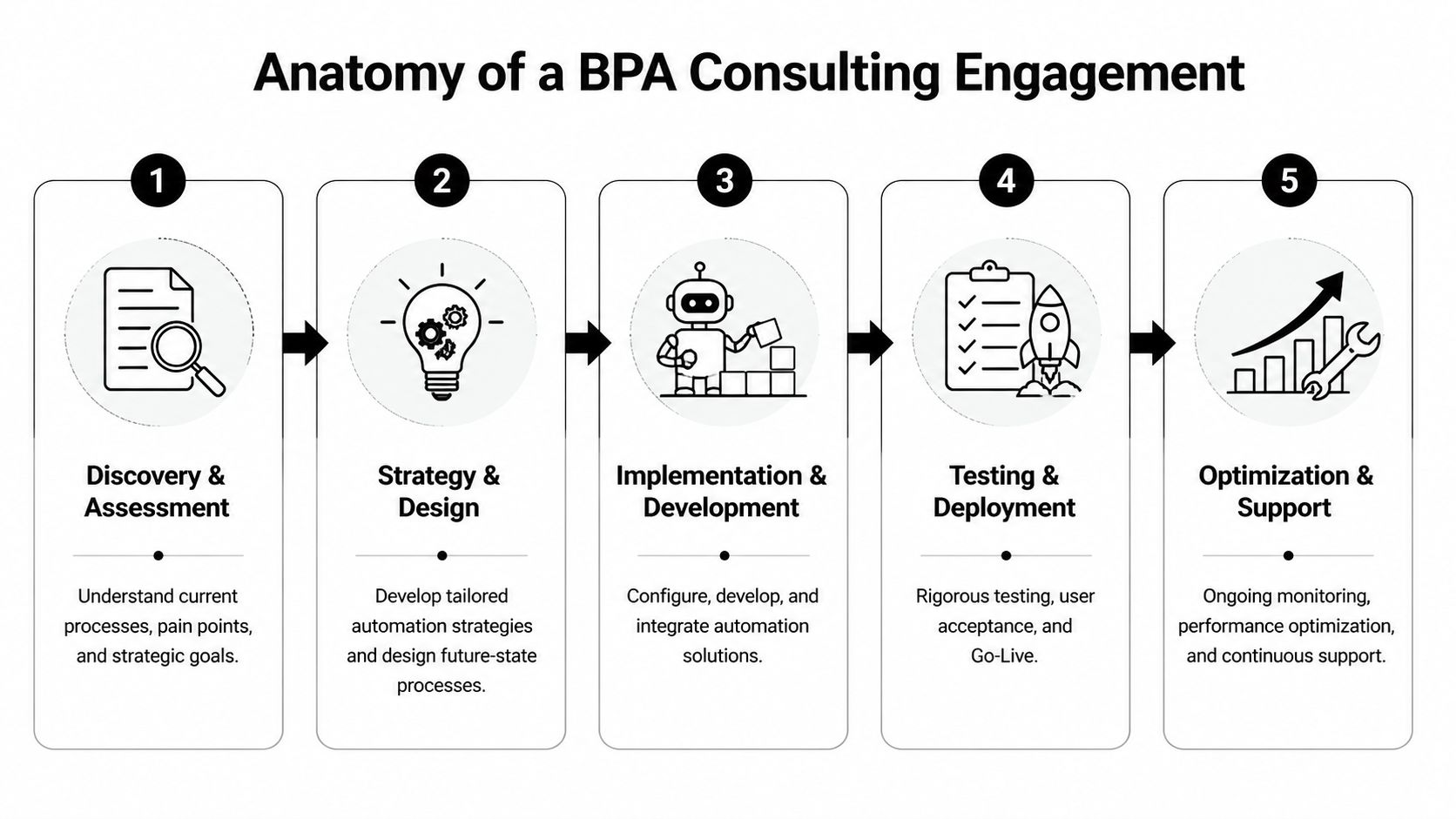
Discovery and assessment
This is the phase most buyers underestimate. During assessment, consultants frequently find that high-volume manual processes run 40-60% longer than automated equivalents, often because of manual data entry errors that can reach 5%. That’s why baseline analysis is essential (assessment findings in BPA consulting).
A real assessment should include stakeholder interviews, workflow mapping, exception review, system inventory, and measurement of current throughput. You want to know where tasks start, where they stall, where data gets changed, and who steps in when the process breaks.
Typical discovery outputs include:
- Current-state process maps: Visuals of how work flows, not how policy says it flows.
- Pain-point analysis: Bottlenecks, duplicate effort, delays, and recurring manual work.
- Candidate scoring: A shortlist of processes ranked by business impact, complexity, and automation readiness.
- Initial ROI model: A realistic business case tied to labor, quality, cycle time, and control.
Strategy and roadmap design
The limitations of weak consulting firms become evident. Anyone can tell you to automate invoice processing or onboarding. The hard part is deciding what should happen first, what dependencies exist, and which platform approach fits your environment.
You need a roadmap that balances value with feasibility. High-volume, rules-based workflows often make strong early candidates, but only if the upstream data is stable and the downstream systems are accessible. A good roadmap also distinguishes between fast wins and foundational work. Sometimes the smartest first move is standardizing inputs or fixing integrations before automating the workflow itself.
A useful roadmap should answer these questions:
- Which process goes first and why
- What systems need to connect
- What human approvals remain in place
- How exceptions will be handled
- How success will be measured after launch
Some teams also need adjacent capabilities beyond automation itself, especially when cloud modernization, security posture, or managed infrastructure are part of the same initiative. In that situation, a broader delivery model like technology and transformation services can matter because the workflow doesn't live in isolation.
If your roadmap has no sequence, no KPI plan, and no exception strategy, it isn't a roadmap. It's a wish list.
Agile implementation and integration
This phase should be iterative, not theatrical. Build a thin slice, test it with real users, validate the data, then expand. That’s how you avoid the classic launch-day surprise where the automation works in demo conditions but fails in production.
The implementation work usually spans several layers:
- Workflow orchestration: Trigger logic, routing, approvals, notifications, and business rules
- Data capture and transformation: Structured forms, OCR or IDP, field validation, and normalization
- System integration: ERP, CRM, HRIS, ticketing platforms, document stores, and APIs
- Security and access controls: Role-based access, audit trails, logging, and policy enforcement
- User experience: The forms, queues, exception screens, and approval interfaces people will use
This is also where AI needs discipline. If a consultant suggests applying AI to every step, be skeptical. AI belongs where classification, extraction, summarization, or decision support adds value. Rule-based work should stay deterministic whenever possible.
Ongoing optimization and support
Most failed automation programs don't fail at deployment. They fail after deployment. The workflow launches, people move on, and nobody tracks whether it still performs as expected when process volumes change, source data shifts, or business rules evolve.
A mature consulting engagement includes operational ownership after go-live. That means monitoring process health, reviewing exceptions, tuning workflows, updating integrations, and validating whether the original ROI assumptions still hold.
Here’s what post-launch support should include:
| Post-launch area | What good looks like | Why it matters |
|---|---|---|
| Process monitoring | Clear visibility into failures, delays, and exception queues | Problems get fixed before users create workarounds |
| KPI review | Regular checks on speed, accuracy, compliance, and throughput | Leadership sees whether business value is actually materializing |
| Change control | Managed updates to rules, forms, and integrations | The workflow evolves without breaking governance |
| User feedback loop | Fast capture of friction from process owners and operators | Small issues don't become process abandonment |
| Scale planning | Expansion to adjacent workflows after validation | You build a capability, not a one-off bot |
This is one place where Dr3amsystems fits naturally as an option. Its operating model spans AI-driven solutions, cloud work, security, hosting, and managed support, which is relevant when automation needs to keep running cleanly after implementation rather than ending at go-live.
How to Evaluate a BPA Consulting Partner
Choosing a partner for business process automation consulting is not procurement theater. It’s risk selection. The wrong firm will automate chaos, create brittle workflows, and call the project done before the business sees durable value.
A useful evaluation framework has to go beyond certifications and slide decks. You need to know whether the partner can diagnose process problems, build secure integrations, and stay accountable after launch.
Start with process judgment, not tool knowledge
Many firms know a platform. Fewer know when a process should not be automated yet.
That distinction matters because a critical prerequisite for successful automation is data hygiene. Some organizations only discover 6-12 months after deployment that 40% of process variations came from inconsistent data entry or undocumented workarounds. At that point, the bot isn't fixing the process. It's amplifying instability (data readiness risk in automation).
Ask direct questions:
- How do you assess whether a process is ready for automation
- How do you detect undocumented workarounds
- What do you do when source data is inconsistent
- How do you decide between process redesign and immediate automation
If they can't answer those without retreating into generic language, keep looking.
Use a practical vendor checklist
| Evaluation Criteria | What to Look For | Why It Matters |
|---|---|---|
| Technical depth | Experience with AI, workflow automation, APIs, cloud platforms, and security controls | Automation rarely succeeds as a standalone tool deployment |
| Process assessment capability | Clear discovery method, current-state mapping, and readiness scoring | You need evidence-based prioritization, not guesswork |
| Integration maturity | Ability to connect ERP, CRM, HR, finance, and document systems | Most friction sits between systems, not inside one app |
| Data quality discipline | Explicit approach to input standardization and exception handling | Dirty data will break even elegant automations |
| ROI measurement model | A plan to track business value after go-live | If value isn't measured, the project becomes anecdotal |
| Operating model after launch | Managed support, optimization, and governance practices | Workflows degrade when nobody owns them long-term |
| Business credibility | Executive references, outcome-based examples, and implementation realism | You want a partner who understands operational stakes |
Look for an end-to-end partner
A narrow implementation shop can be fine for isolated workflows. It’s the wrong choice for a serious operating-model change. Most first-wave initiatives quickly expose adjacent needs, including cloud migration, data pipelines, access control, hosting, and security hardening.
That’s why a broader partner model often wins. If your automation vendor can’t handle surrounding architecture and support requirements, your internal team ends up stitching the engagement together.
The right partner should be able to tell you where automation fits inside your wider technology strategy, not just where to click inside a workflow builder.
Demand answers to the hard questions
You should expect concrete responses on these topics:
- Data readiness: How will you validate that the process inputs are stable enough to automate?
- Exception management: What happens when the workflow hits missing fields, conflicting records, or policy edge cases?
- Measurement: How will you report business value beyond labor reduction?
- Governance: Who owns updates, controls, and release discipline after go-live?
- Change management: How will process owners and operators be trained without slowing adoption?
A capable partner won't dodge those questions. They'll welcome them.
Automation Success Stories and Common Pitfalls to Avoid
The upside of automation is real. So are the failure patterns. Most executive teams hear plenty about faster workflows and lower manual effort. They hear far less about the reasons automation stalls after launch.

What success looks like
The clearest success stories share a pattern. The company doesn't automate randomly. It picks a painful workflow with repetitive decisions, messy inputs, and obvious operational drag. Then it redesigns the workflow, structures the data, and introduces automation where rules and AI each make sense.
If you're collecting examples to shape your own use cases, this roundup of ways to automate your business processes is a helpful reference because it shows how automation gets applied across common back-office and document-heavy tasks.
Success usually includes a few traits:
- A process owner is accountable: Someone in the business owns outcomes, not just the build.
- Inputs are standardized enough to trust: The workflow isn't fed random variations from five different channels.
- Exceptions are visible: Edge cases route to people quickly instead of disappearing into a queue.
- The automation fits the architecture: Systems connect cleanly enough that the workflow doesn't depend on brittle workarounds.
When those conditions exist, automation becomes an operating improvement. Without them, it becomes a fragile patch.
Pitfall one is automating a bad process
This is the most common mistake. Teams pick a process because it’s painful, not because it’s ready. Pain is a signal. It isn't a green light.
If the process includes inconsistent naming, undocumented approvals, duplicate records, or policy conflicts between departments, automation won't clean that up by itself. It will codify confusion. The result is often a workflow that technically runs but still requires constant human intervention to fix exceptions.
A better approach is to pause before implementation and ask:
- Are the decision rules explicit
- Are the source fields consistent
- Do all teams follow the same version of the process
- Can we define what counts as a valid exception
If the answer is no, process cleanup comes first.
Pitfall two is the set-it-and-forget-it trap
This one is more dangerous because it hides behind a successful launch. The automation goes live. Early feedback is positive. Then nobody keeps measuring whether the workflow is still producing the intended result.
That blind spot is common. Much of the business process automation conversation focuses on deployment, while failing to explain how to measure ROI beyond labor hours or how to track continuous optimization. That leaves companies without a framework to tell whether bots are improving accuracy, compliance, or throughput over time (post-implementation ROI measurement gap).
A disciplined post-launch model should include:
- Operational metrics: Is the process completing on time and routing exceptions correctly?
- Quality metrics: Are records cleaner and errors lower than before?
- Compliance checks: Are approvals, logs, and audit trails intact?
- Business feedback: Do process owners still trust the workflow enough to keep using it?
Here’s a practical explainer for teams thinking about what mature automation oversight should look like in practice:
The firms that avoid these pitfalls build feedback loops
The strongest automation programs don't treat launch as the finish line. They keep refining. They review exception patterns, tune business rules, adjust integrations, and feed what they learn into the next workflow.
That’s also why your partner's thought process matters more than their sales pitch. Teams evaluating strategic automation direction often benefit from broader implementation guidance and operational commentary published in places like Dr3am Insights, especially when they’re trying to avoid repeating the same post-launch mistakes.
Automation creates value when the workflow keeps improving after go-live. If nobody owns the feedback loop, value decays.
Your Next Steps Toward Intelligent Automation
If you're serious about automation, don't start with a vendor bake-off for software. Start with one business process that is high-friction, high-volume, and painful enough that leaders already feel the cost. Then assess whether the process is ready.
That means documenting how work moves today, identifying where data quality breaks it, and deciding which parts should be rules-based, AI-assisted, or left in human hands. It also means choosing a partner that can support the whole journey, including discovery, implementation, cloud architecture, security, and post-launch optimization.
A workable first move
Use this sequence:
- Pick one candidate workflow: Invoice intake, onboarding, approvals, document routing, or another process with visible friction.
- Baseline the current state: Measure handoffs, delays, errors, and exception patterns qualitatively and quantitatively where available.
- Validate automation readiness: Standardize inputs, clarify rules, and surface undocumented workarounds before you build.
- Launch a focused implementation: Solve one meaningful process end to end instead of scattering effort across six pilots.
- Commit to optimization: Treat support, monitoring, and refinement as part of the business case from day one.
What a good partner should help you get done
A mature consulting team should help you clarify goals, identify realistic opportunities, design a roadmap, and protect the business from rushed decisions. That matters even more if your automation initiative overlaps with AI adoption, cloud migration, security controls, or managed hosting.
If you want a practical starting point, book a conversation that focuses on your process realities rather than generic automation hype. A free consultation through Dr3amsystems should help you clarify the target workflow, surface hidden risks, and define a roadmap tied to business value instead of tool enthusiasm.
Frequently Asked Questions About BPA Consulting
How long does a business process automation consulting engagement usually take
It depends on the scope and the readiness of the process. A narrow workflow with stable inputs and clear rules can move quickly. A cross-functional workflow that touches legacy systems, compliance controls, and inconsistent source data will take longer because the process itself needs cleanup before automation can hold.
The right question isn't “How fast can you build it?” It’s “How fast can you build something stable enough that the business keeps using it?”
Is BPA consulting only for large enterprises
No. Mid-market companies often get strong value from automation because they feel operational drag earlier and have less tolerance for wasted effort. In many cases, they also have fewer layers of bureaucracy, which can make decisions faster.
What matters is not company size. It’s process volume, repetition, and the cost of inconsistency.
Will automation replace employees
The better outcome is role redesign, not indiscriminate replacement. When automation works, teams spend less time on repetitive admin and more time on exception handling, customer interaction, analysis, and decision support.
That shift requires communication. If leadership frames the initiative only as labor reduction, adoption will suffer.
What kinds of processes are usually best for a first project
The strongest first projects tend to have clear rules, repeatable steps, and visible business pain. Good examples often include approvals, document intake, record updates, onboarding tasks, or reconciliation workflows.
Avoid starting with the most politically complicated process in the company. Start where the value is clear and the path to standardization is realistic.
How should we handle change management
Put process owners and users into the design loop early. They know where workarounds exist and where the official process differs from reality. Their involvement also reduces resistance later because they can see that the new workflow is built for actual operations, not for a slide deck.
Training also matters. People need to know what changed, what stayed manual, and where exceptions go.
What should we ask in the first consulting call
Ask how the partner evaluates process readiness, how they handle bad data, how they measure value after launch, and what support model they offer once the workflow is live. Those answers will tell you more than a product demo ever will.
If you want more operational questions answered before that conversation, the Dr3amsystems FAQ is a useful place to review broader service and delivery topics.
If your team is planning its first major automation initiative, talk to Dr3amsystems. The right first step is a practical conversation about your workflows, your data, your systems, and the ROI you need. A free consultation can help you identify automation candidates, uncover readiness risks, and outline a roadmap that fits your business instead of forcing your business to fit a tool.