
The ai business process automation market isn’t moving because vendors need a new buzzword. It’s moving because operators need an advantage. The global Business Process Automation market sits at roughly US$13 to 15 billion in 2024 and is projected to reach US$23.9 billion by 2029, while the Intelligent Process Automation segment is projected to reach USD 48.8 billion by 2034 according to business automation market statistics. CTOs should read that for what it is. A signal that intelligent automation is becoming part of the operating model, not a side experiment.
Most companies already understand the appeal of automation. Fewer understand what separates a useful pilot from enterprise value. The difference is architecture, governance, and hard operational discipline. AI business process automation only works when you connect strategy to systems, processes, data, and change management in one plan.
That’s the gap many leadership teams still need to close.
The Strategic Imperative of AI Business Process Automation
74% of organizations using AI plan to increase their investment over the next three years, according to McKinsey’s State of AI research. CTOs should read that as an execution signal. AI business process automation has moved out of innovation labs and into the core operating model.
Traditional automation followed rigid rules. It handled predictable inputs and failed on exceptions. AI automation extends that model into the work that slows enterprises down: interpreting documents, classifying requests, handling variable workflows, and supporting decisions across messy system environments.
Why this moved from optional to urgent
The pressure is not only competitive. It is structural. Enterprises are carrying higher service expectations, tighter margin targets, and more process complexity across legacy platforms, cloud applications, and fragmented data stores. If your workflows still depend on people to rekey information, interpret inbox requests, or manually route cases between systems, your operating model is already too expensive and too slow.
That shift changes the boardroom conversation. AI automation is no longer a narrow efficiency program. It is a way to improve service consistency, reduce avoidable labor, and create an operating layer that can adapt without constant process redesign.
Customer operations make the point clearly. If service quality and retention sit inside your AI roadmap, this strategic guide to AI for customer success reframes automation as a service quality lever, not just a cost lever.
What CTOs should optimize for
Focus on automation that survives production conditions.
That means prioritizing:
- Workflows that can interpret unstructured inputs such as emails, PDFs, forms, tickets, and chat transcripts
- Integration patterns that work with legacy systems instead of forcing a full platform replacement before value appears
- Control mechanisms including audit trails, exception handling, access controls, and clear escalation paths
- Measurement tied to business outcomes such as cycle time, error rates, service levels, and cost per transaction
- Architecture that scales across functions so one successful pilot can become an enterprise capability
AI automation should remove operational drag and increase control at the same time.
A CTO should also reject pilot thinking. The question is not whether one workflow can be automated. The question is whether your data, integrations, governance model, and support structure can carry automation from one team to the rest of the business with measurable ROI. That is where many programs stall.
Dr3amsystems addresses that gap with practical guidance on modernization, automation, cloud, and security in its enterprise technology insights on AI and modernization. Use that standard when you evaluate your own environment. If the design cannot handle exceptions, legacy integration, and proof of value, it will not scale.
Measuring the Business Impact of Automation
AI business process automation earns budget when it improves business performance in ways a CFO and a COO can measure. The results that matter are shorter cycle times, lower cost per transaction, fewer errors, better compliance, and clearer operating visibility across teams.

Efficiency that changes margin, not just workload
Many automation programs fail because they target convenience instead of economics. Start with processes that absorb skilled labor for repetitive review, routing, validation, and follow-up. That is where AI automation changes the cost structure.
Customer service makes the point clearly. An AI-driven workflow can classify incoming requests, pull context from prior interactions, complete routine actions in connected systems, and send only true exceptions to an agent. The gain is not just speed. It is lower handling cost, more consistent responses, and a service model that scales without adding headcount at the same rate as volume.
That is the standard CTOs should use. If the workflow cannot reduce unit cost or increase throughput, it should not be high on the roadmap.
Better process decisions from unstructured inputs
A large share of operational delay starts before a workflow even reaches a system of record. Requests arrive through email, PDFs, chat, forms, attachments, and ticket notes. Teams then read them manually, extract key details, decide what they mean, and re-enter the same information across multiple systems.
AI business process automation fixes that break in the process. It turns messy inputs into structured actions. A request can be interpreted, prioritized, enriched with relevant data, routed into the correct application, and tracked through completion with a clear audit trail. That is how you get faster execution without losing control.
If you want a broader view of where organizations typically see gains first, this breakdown of business process automation benefits is useful because it ties operational improvements to specific business functions.
Experience improves when the workflow is redesigned
Customer experience and employee experience improve for the same reason. Friction disappears when the process is designed around outcomes instead of handoffs.
Executives often miss this point. AI automation is not a layer you place on top of a broken workflow. It is a redesign of who handles which decision, when a human should intervene, and how work should move across systems. The strongest programs separate routine work from judgment-heavy work, then automate the first category aggressively.
That usually means:
- Routine service requests are resolved automatically when the policy path is clear
- Exception handling goes to the right person with the right context
- Approvals follow policy logic and business rules instead of inbox chains
- Data entry and rekeying disappear from the process design
The outcome is practical. Employees spend less time chasing information. Customers get faster, more accurate responses. Leadership gets a process that can be measured, improved, and scaled.
For organizations that need these workflows connected to existing business systems, custom AI automation application development services help turn a good business case into a deployable operating model. That is the gap between strategy slides and production value, especially in environments with legacy platforms, fragmented data, and hard ROI targets.
AI Automation Use Cases Across Your Organization
The fastest way to understand ai business process automation is to stop thinking about it as one platform initiative. Think in terms of operational choke points. Every function has them. Finance. HR. Service. Operations. The common pattern is manual review, rekeying, routing, and follow-up.

Finance and procurement
Finance teams often run critical workflows through email, spreadsheets, ERP screens, and approval chains that nobody wants to admit are fragile. Invoice intake is a common example. Documents arrive in different formats, analysts validate fields manually, exceptions bounce between departments, and approvals stall because context is missing.
A smarter design ingests invoices from multiple channels, classifies them, extracts key fields, checks them against business rules, routes exceptions, and records an audit trail. The finance team still owns the judgment calls. They stop spending time on predictable verification work.
Architecture matters more than hype. The useful question isn’t whether AI can “read documents.” It’s whether the workflow can turn those inputs into a governed process that finance leadership trusts.
Human resources and onboarding
HR teams rarely need flashy AI. They need clean execution. Candidate intake, document handling, onboarding checklists, policy acknowledgments, account setup, and recurring employee requests all create avoidable friction.
A good automation pattern in HR does three things well:
- Intake and classification of incoming employee or candidate requests
- Cross-system coordination between HRIS, IT service management, identity, and communications tools
- Exception handling so people step in only when a policy, missing document, or unusual case requires review
For organizations building internal workflow applications around those handoffs, the custom application approach from Dr3am Apps is relevant because many bottlenecks come from forcing teams to work around software gaps rather than fixing the workflow itself.
Customer service and support operations
Support environments expose process inefficiency immediately. Long queues, repetitive tickets, inconsistent responses, and agent burnout all show up fast. AI automation helps when you apply it to triage, knowledge retrieval, intent detection, summarization, and follow-up orchestration.
The strongest service use cases usually start with routine request categories. Password help. Order status. document requests. basic policy questions. appointment changes. Those are ideal candidates for intelligent intake and automated resolution paths, with escalation rules for edge cases.
Don’t automate every support interaction at once. Automate the categories with clear resolution patterns, then expand.
A short explainer on the broader shift is below.
Operations and service delivery
Operations teams usually inherit the worst process fragmentation. A task starts in one system, picks up context in another, waits on a person to reconcile the difference, then stalls because no one owns the full chain. AI business process automation helps because it can coordinate events across systems, detect exceptions, and trigger the next action without waiting for an inbox review.
That can apply to scheduling, work order routing, service request handling, inventory coordination, contract review queues, or internal approvals. The exact use case matters less than the pattern. High-volume work with recurring decisions belongs in an orchestrated workflow, not in tribal knowledge and manual follow-up.
Marketing and revenue operations
Marketing and revenue teams create their own automation debt. Leads arrive from multiple sources, enrichment is inconsistent, handoffs to sales get delayed, and follow-up cadence depends on whether someone remembered to update a record.
In these environments, automation works best when it handles lead intake, segmentation, CRM updates, follow-up triggers, and internal alerts while preserving human ownership over messaging and deal strategy. This is less about replacing teams and more about making sure handoffs happen on time and in the right order.
Across all of these departments, the principle stays the same. Start where the workflow is repeatable, painful, and important. Don’t start where the demo looks clever.
Designing Your Technical Architecture for Integration
Most AI automation projects don’t struggle because the model is weak. They struggle because the environment is messy. Systems are fragmented. Data is inconsistent. Security teams need control. Business units need uptime. And legacy applications refuse to cooperate.
That’s why architecture should come before scale.
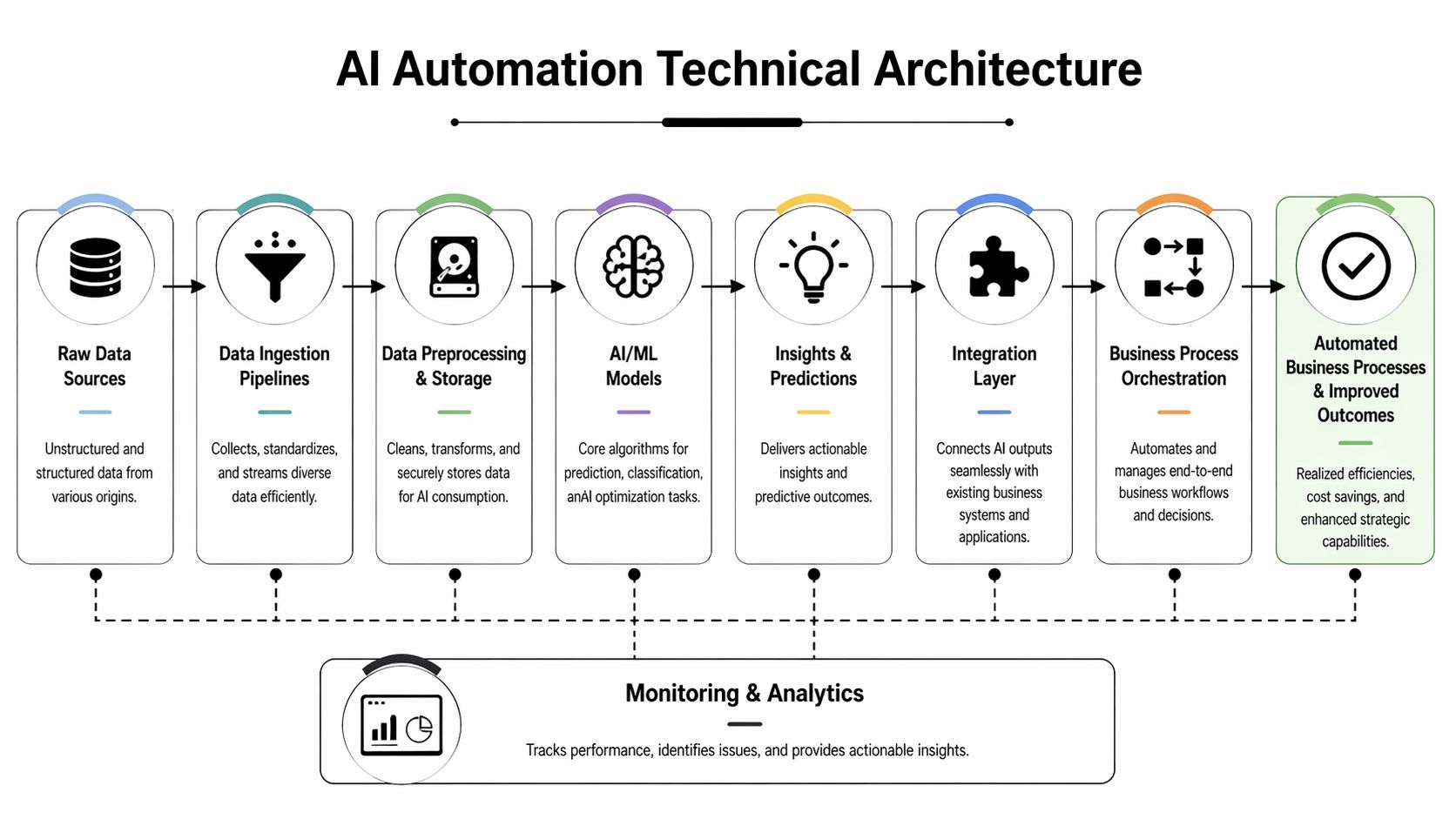
The core layers you actually need
A workable AI automation architecture usually includes several distinct layers. If one is weak, the whole workflow becomes unreliable.
| Layer | What it does | Why it matters |
|---|---|---|
| Data sources | Pulls in structured and unstructured inputs from systems, documents, messages, and forms | Automation fails if it only sees part of the process |
| Ingestion pipelines | Collects and standardizes incoming data | You need consistent inputs before models or rules can act |
| Preprocessing and storage | Cleans, transforms, and stores data securely | Dirty data creates bad routing and bad decisions |
| AI and ML models | Classifies, predicts, extracts, or summarizes | This is where intelligence enters the workflow |
| Integration layer | Connects outputs to ERP, CRM, ticketing, identity, and line-of-business apps | Without this, AI stays isolated |
| Process orchestration | Manages the workflow, approvals, exceptions, and task sequencing | This turns predictions into business action |
| Monitoring and analytics | Tracks performance, failures, and adoption | Leaders need operational visibility, not assumptions |
The integration layer deserves more attention than it usually gets. Most failures happen there.
Why legacy systems break good intentions
One of the most important realities in enterprise AI automation is that legacy integration is often brittle. AI automation tools often struggle with legacy systems because integrations have been described as “onerous and brittle, often breaking when one system changes its data model”, as noted in this discussion of AI workforce transformation and integration constraints.
That quote is blunt and accurate. If your workflow depends on screen scraping, unstable connectors, or undocumented dependencies, your automation estate becomes fragile by design. The issue isn’t only technical. It’s operational. Every break introduces manual work, escalations, delay, and distrust.
Build for change. If your integration pattern assumes upstream systems will stay static, it won’t survive contact with the enterprise.
The architectural patterns that hold up
There isn’t one universal blueprint, but several patterns consistently reduce risk.
API-first where possible
If a system exposes usable APIs, use them. They’re easier to govern, test, monitor, and version than brittle interface-level automations. APIs also make it easier to preserve auditability and enforce access control.
Microservices for separation of concerns
When logic is broken into services, teams can update one part of the workflow without destabilizing everything else. That matters in long-running automation programs where models, business rules, and downstream systems evolve at different speeds.
Event-driven orchestration
For processes that span multiple systems, event-based triggers reduce latency and improve responsiveness. Instead of polling and waiting, workflows react to state changes as they happen.
Security by design
AI automation expands the attack surface if you bolt it on carelessly. Identity, access controls, encryption, logging, and data handling policies need to be embedded from the start, especially in regulated environments.
For organizations modernizing these foundations in parallel with automation work, Dr3am Cloud services are relevant because cloud migration, integration design, and secure workload execution usually need to move together.
What a future-proof stack looks like
A strong architecture doesn’t chase every new model release. It gives your business options. You should be able to swap models, add connectors, revise rules, and expand workflows without rebuilding the estate every quarter.
That means choosing modular components, documenting interfaces, enforcing governance, and treating observability as a first-class requirement. If you can’t see where the workflow failed, you can’t scale it responsibly.
Executing A Phased AI Automation Adoption Roadmap
A lot of organizations don’t have an idea problem. They have an execution problem. They can identify painful workflows. They can see where AI might help. Then the initiative stalls because nobody can prove financial value, nobody agrees on ownership, and employees don’t trust the change.
That gap is real. While 92% of companies plan to increase AI investment, many organizations still struggle to quantify ROI after implementation or manage resistance during transition, according to this analysis of the AI automation ROI and change management gap.
A phased roadmap fixes that because it forces discipline.
Phase one starts with process economics
Don’t begin with tools. Begin with operational friction.
Map the process as it exists today. Identify where people re-enter data, wait for approvals, reconcile mismatched records, or manually route work between systems. Then decide whether the process is stable enough to automate or whether it first needs redesign.
This is also where a free consultation is useful if you need an external view of the operational environment. The right discovery effort should clarify goals, surface automation candidates, and define which opportunities are worth piloting first.
Treat the pilot as a business test, not a science fair
A pilot should answer three questions. Does the workflow work technically? Do users trust it? Does the business benefit justify expansion?
That means setting the baseline before you touch the process. Capture cycle time, handoff delays, error sources, exception patterns, and the amount of human involvement required. Then compare the pilot against those baselines after deployment.
Practical rule: If your pilot doesn’t have named owners, a measured baseline, and a defined decision point for scale, it isn’t a pilot. It’s drift.
AI Automation Adoption Roadmap Phases
| Phase | Key Activities | Primary Goal |
|---|---|---|
| Discovery and strategy | Process mapping, opportunity assessment, stakeholder alignment, baseline definition, architecture review | Identify the right use cases and build the business case |
| Pilot and proof of concept | Limited-scope deployment, user testing, workflow validation, baseline comparison, exception analysis | Prove feasibility and initial value |
| Scaling and integration | Expand to adjacent workflows, connect more systems, strengthen governance, harden security and monitoring | Move from isolated success to repeatable enterprise capability |
| Governance and optimization | Ongoing performance review, model tuning, policy updates, support processes, change management | Sustain value and improve the automation estate over time |
Scale only after you harden the foundations
Once the pilot demonstrates value, the next move isn’t “automate everything.” It’s to expand in a controlled sequence. Start with adjacent workflows that share systems, stakeholders, or data patterns. That reduces implementation drag and makes operational ownership clearer.
At this point, focus on four disciplines:
- Integration hardening so new workflows don’t multiply brittle dependencies
- Security and access control to keep data exposure in check
- Support and incident management for workflow failures and exception handling
- Adoption management so teams know when to trust automation and when to intervene
Governance is where long-term value gets protected
The final phase is where organizations either become effective operators or accumulate silent risk. Governance doesn’t mean slowing the program down. It means deciding who owns model updates, process rules, audit trails, performance reviews, and exception policies.
You also need a way to review what success means over time. Some workflows should drive cost reduction. Others should improve service consistency, reduce manual burden, or increase throughput. If you don’t define those outcomes clearly, your program will collect activity and miss value.
A mature roadmap keeps technical execution and business accountability tied together. That’s the only way AI automation becomes part of operations instead of another stalled initiative.
Selecting Your Partner and Measuring True Success
The wrong implementation partner creates two kinds of damage. First, they overpromise. Then they leave you with a brittle workflow nobody wants to own. AI business process automation is not the place for slideware, shallow accelerators, or disconnected point solutions.
Choose a partner the same way you’d choose a platform for a mission-critical environment. Look for enterprise-grade delivery discipline, architecture depth, security maturity, and operational support after launch.

What to evaluate before you sign
A credible partner should be able to show you how they handle these questions:
- Strategy and delivery alignment so use case selection ties directly to business outcomes
- Integration capability across cloud platforms, legacy systems, line-of-business apps, and workflow tooling
- Security and governance that match your operational and regulatory needs
- Managed support after deployment, because workflows need tuning, monitoring, and incident response
- Measured outcomes rather than generic claims about innovation
That’s also where the service model matters. AI automation services from Dr3amsystems cover strategy, implementation, and ongoing optimization across AI-driven workflows, cloud modernization, security, hosting, and managed support. For many organizations, that end-to-end scope is more useful than buying separate vendors for architecture, deployment, and post-launch care.
Measure what the business feels
If you can’t show operational impact, the initiative won’t survive budget scrutiny. Don’t rely on vanity metrics like model usage or workflow count. Track what changes in the business.
A practical KPI set usually includes:
| KPI area | What to monitor | Why it matters |
|---|---|---|
| Process speed | Cycle time, queue time, approval time | Shows whether automation is reducing delay |
| Cost | Cost per transaction or cost to serve | Links automation to financial impact |
| Quality | Error patterns, rework, exception rates | Reveals whether the workflow is reliable |
| Adoption | Usage behavior, override frequency, escalation patterns | Tells you whether teams trust the system |
| Experience | Customer feedback and employee feedback | Confirms whether the operating experience improved |
For teams building a disciplined measurement practice, this guide to AI automation ROI tracking is a useful operational reference because it keeps attention on business outcomes rather than tooling activity.
Good automation reduces work, improves control, and holds up under audit. If it only looks impressive in a demo, it has no business in production.
The benchmark to look for is measurable operational improvement tied to execution, not just implementation. Dr3amsystems cites 60% reductions in processing time and zero-downtime transitions in its delivery profile. That’s the standard CTOs should expect from any serious partner. Not promises. Outcomes.
Begin Your Automation Journey Today
AI business process automation is no longer a future-state concept reserved for innovation labs. It’s a practical operating lever for companies that want cleaner execution, stronger resilience, and more control over cost, service, and scale. A key question isn’t whether AI can automate business processes. It can. A key question is whether your organization will implement it with enough discipline to produce lasting value.
The path is straightforward, even if the work isn’t simple. Start with high-friction workflows. Build around integration reality, not vendor demos. Put governance in place early. Measure value from the first pilot. Then scale what proves itself.
Most organizations don’t need more fragmented tools. They need a roadmap that ties process design, architecture, data, security, and adoption together. That’s how you turn isolated automation efforts into a durable capability.
If you’re ready to define that roadmap, start with a focused conversation. A structured discovery process will identify where AI automation fits, which workflows should come first, what technical constraints need attention, and how to measure success without hand-waving.
You can begin that process through the Dr3amsystems consultation page. The point isn’t to launch a vague AI initiative. It’s to make specific operational decisions that improve how your business runs.
The companies that win with automation don’t treat it like a side project. They treat it like infrastructure for better execution.
Dr3amsystems helps organizations move from AI ambition to operational delivery through AI-driven solutions, secure cloud migrations, and managed support that keep critical systems running while new automation capabilities come online. If you need a practical roadmap for ai business process automation, book a free consultation with Dr3amsystems.