
Operations rarely break in one dramatic moment. They usually fray at the edges first. A sales handoff gets missed. Two teams follow different approval paths for the same request. A new hire asks how something is done and gets three different answers.
That’s the point where business process definition stops being a documentation exercise and becomes an operating priority. If you’re a CTO or technology leader, process definition gives you something more useful than a pretty diagram. It gives you a reliable picture of how work moves through the business, where it slows down, and where automation or AI can help without creating chaos.
Why Defining Your Business Processes Is No Longer Optional
A CTO joins a fast-growing company and asks a simple question: “How does a customer order move from sale to delivery?” Sales gives one answer. Operations gives another. Finance adds a manual approval step nobody mentioned. The business is still running, but it is running on memory, workarounds, and individual heroics.
That model breaks under scale.
Business process definition turns that hidden operating model into something a company can inspect and improve. It names the trigger, the steps, the handoffs, the decision points, and the expected result. Once that is clear, leaders can reduce rework, train new people faster, choose the right systems, and evaluate where AI or cloud automation will help instead of interfere.
An old management idea with a very current payoff
The basic logic has been around for centuries. Adam Smith’s famous description of pin manufacturing showed that output rises when work is divided into clear, repeatable steps with defined roles, as summarized in Gluu’s overview of business process definition.
The historical example matters for one reason. Defined work is visible work. When you can see the sequence, you can spot bottlenecks, unnecessary approvals, duplicate data entry, and tasks that a system can handle better than a person.
For modern technology leaders, that visibility is not just an operations benefit. It is the starting point for digital transformation.
AI systems need structure. Automation platforms need rules. Cloud workflows need known inputs and outputs. If the process itself is fuzzy, every technology decision sits on unstable ground. A poorly defined approval flow does not become efficient because it was moved into SaaS. A team does not get better forecasting because a copilot was added on top of inconsistent data and unclear responsibilities.
Practical rule: If a critical workflow depends on one experienced employee remembering the “real” way to do it, the process is still undocumented risk.
Why this now gets executive attention
Process definition used to be treated as back-office housekeeping. That view no longer fits the market or the technology stack companies are building. Analysts at Fortune Business Insights project the business process management market will grow from $15.38 billion in 2024 to $65.83 billion by 2032, according to its Business Process Management Market Size report.
That growth reflects a practical shift in how companies operate. Process design now sits upstream of automation, compliance, system integration, and AI deployment. In plain terms, if you want to know where to apply machine learning, workflow automation, or cloud orchestration, start by mapping how work gets done today.
For a new CTO, the takeaway is direct. Define the business process before you modernize the tooling around it. Otherwise, you risk encoding exceptions, delays, and confusion into the next generation of systems.
The Anatomy of a Business Process
A business process is easiest to understand when compared to a recipe. A recipe doesn’t just name the meal. It tells you what goes in, what happens in what order, who or what does the work, and what “done” looks like.
That same structure applies whether you’re handling customer orders, provisioning software access, or reviewing invoices.
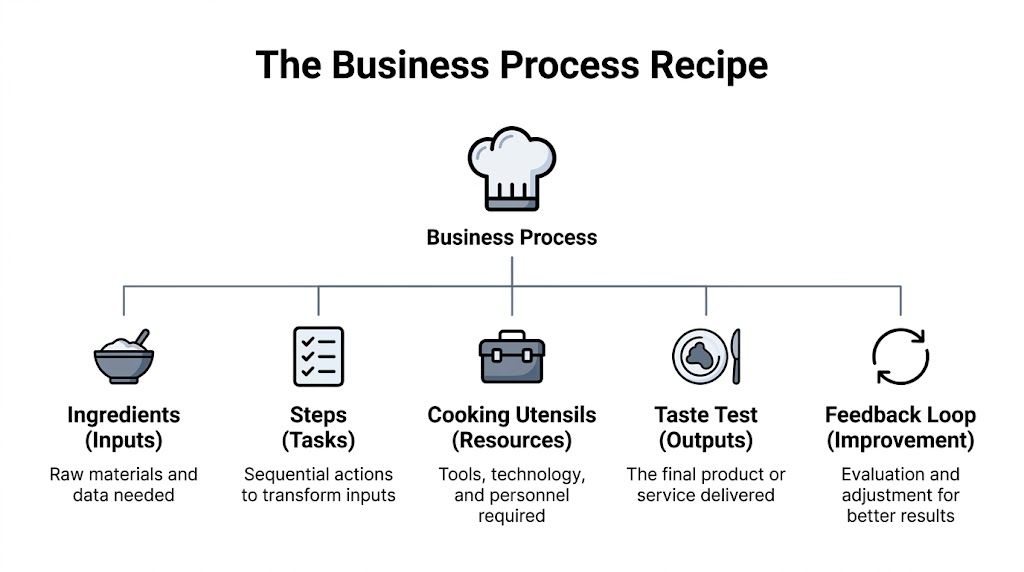
The recipe view of process design
If a customer places an order, the process doesn’t begin with “fulfill order.” It begins with the trigger, then the required information, then the actions, then the final result. That framing helps teams avoid a common mistake. They jump to solutions before agreeing on what the process includes.
Here are the core building blocks.
| Component | Description | Simple Example (Customer Order) |
|---|---|---|
| Inputs | The information or materials needed to start work | Order details, customer address, payment status |
| Steps | The actions taken in sequence | Validate order, pick items, pack shipment, send confirmation |
| Actors | The people or systems doing the work | Sales rep, warehouse staff, ERP system |
| Rules | The conditions or decisions that guide the flow | Don’t ship until payment clears |
| Trigger | The event that starts the process | Customer submits an order |
| Outputs | The result the process is meant to produce | Shipped order and confirmation email |
Where readers usually get confused
Many people mix up a task with a process. A task is one action. “Approve invoice” is a task. A process is the full chain around that task, including receipt, validation, approval routing, posting, and notification.
Another confusion point is ownership. A process can cross several departments and still be one process. New customer onboarding, for example, may involve sales, legal, finance, IT, and customer success. If each team only sees its own step, no one sees the total experience.
A process isn’t defined by org chart boundaries. It’s defined by how work moves from trigger to outcome.
Why this structure matters for technology decisions
When a CTO sees a process in components, technical priorities become clearer. Inputs suggest integration needs. Steps reveal automation candidates. Rules point to workflow logic. Actors show where handoffs occur between people and systems. Outputs define what should be measured.
That’s the hidden value of business process definition. It gives technical teams a shared language with operations teams. Without that shared language, software selection and automation design often drift away from business reality.
Business Process Examples in the Real World
Abstract definitions only help up to a point. Most leaders understand processes better when they see complete examples with a clear trigger, a path through the business, and a final outcome.

A core process example
A prospect signs a contract. That event triggers new customer onboarding.
Sales hands off the account details. Finance confirms billing setup. Legal checks contract terms. IT provisions access. Customer success schedules kickoff and training. The output is a live, active customer who can use the product or service as intended.
This is a core process because it directly affects revenue and customer experience. If this process is inconsistent, customers feel the friction immediately.
A supporting process example
An employee submits a travel expense after a client visit. That starts an expense reimbursement process.
The employee uploads receipts. A manager reviews the submission. Finance checks policy compliance and coding. The payment system issues reimbursement. The output is a recorded, approved, and paid expense.
This is a supporting process. It doesn’t create revenue directly, but it helps the organization function. If it breaks, employees lose trust in internal operations and finance teams spend time cleaning up avoidable errors.
A management process example
A leadership team begins a quarterly performance review cycle.
Department heads gather operating data, review goals, identify blockers, and propose changes in budget or staffing. Executives evaluate progress, make decisions, and communicate priorities for the next quarter. The output is a revised operating plan with clear direction.
This is a management process because it governs how the company monitors and steers performance.
What these examples have in common
The three examples differ in purpose, but they share the same structure:
A trigger starts the work
A signed contract, an expense submission, or the start of a review cycle kicks things off.Several actors participate
Work moves across roles, departments, and systems.The process ends with a specific output
A live customer, a reimbursed employee, or an approved operating plan.
That’s why business process definition works across the whole enterprise. The same logic applies whether the process serves customers, employees, or leadership.
How to Map and Document Your Processes
Teams often make process mapping harder than it needs to be. They assume they need a polished notation standard before they can begin. In practice, the first job is simpler. Capture what really happens, not what the handbook says should happen.
A useful structure is the seven-phase business process lifecycle described by monday.com’s business process guide: define objectives, map the current state, identify improvements, design the new process, test with a pilot, roll out to the team, and continuously monitor for refinement.

Start with the current state
Document the process as it exists today. Don’t skip to the ideal version. If invoice approvals really happen through email, chat messages, and one manager’s spreadsheet, write that down.
A simple way to start is with a flowchart in Lucidchart, Miro, Microsoft Visio, or even a whiteboard. If your team needs more formal modeling later, BPMN can help standardize how tasks, decisions, and events are represented.
Use these prompts while mapping:
- What triggers the process
- What inputs are required
- Which steps happen in order
- Where decisions change the path
- Who owns each step
- What output marks completion
Then design the improved version
After the current state is visible, bottlenecks become easier to spot. Maybe approvals stack up with one manager. Maybe data is entered twice into different systems. Maybe the process waits on information nobody requested clearly.
That’s the point to redesign the flow, not before.
The best process maps aren’t artistic. They’re honest.
A healthcare team working through patient journey mapping, for example, often finds that delays don’t come from a single failure. They come from scattered handoffs, unclear ownership, and duplicate communication across touchpoints. The same pattern shows up in internal business operations.
Keep the documentation practical
Good process documentation should help three people immediately: the person doing the work, the manager improving the work, and the technologist supporting the work.
A practical process document usually includes:
Process name and purpose
Say what the workflow does and why it exists.Trigger and endpoint
Define where the process starts and what counts as finished.Roles and systems involved
Name the teams, applications, and approvals in the flow.Exceptions and decision points
Show what happens when the happy path breaks.Measures to watch
Track completion quality, speed, backlog, or error patterns.
If you’re building a broader improvement program, a more formal business process framework can help teams keep documentation consistent across departments.
Uncovering AI and Automation Opportunities
A CTO usually sees the automation conversation start in the wrong place. Someone asks for an AI tool, a chatbot, or a faster workflow engine before anyone has clarified how the work moves. Process definition fixes that. It turns digital transformation from a shopping exercise into an operational design exercise.
Once a process is visible, automation opportunities become easier to spot. You can see where employees rekey data, where requests sit in queues, where approvals follow the same pattern every time, and where documents arrive in formats people have to interpret by hand.

What a process map reveals that a dashboard can’t
A dashboard is a speedometer. A process map is the view under the hood.
If ticket resolution is slow, a dashboard may show average closure time and backlog growth. A process map shows why the delay happens. Intake data may be incomplete. Triage rules may vary by person. Specialists may wait for the same missing fields before they can begin. That level of detail is what turns a vague goal like “use AI here” into a practical decision about where AI can classify, route, summarize, or validate work.
Analysts at Gartner have tracked how enterprises are embedding AI into business operations, and Forrester has also highlighted the visibility problems that slow adoption inside mid-market firms. The pattern is consistent even without leaning on a secondary summary. Companies want AI, but many still lack a clear view of the process context around it.
That context matters because AI does not operate in a vacuum. It sits inside a workflow, with inputs, rules, owners, exceptions, and review points.
Strong candidates for automation
Good automation targets usually share one trait. The work repeats often enough that every manual step behaves like a tax on the business.
Look for patterns like these:
Repeated data transfer
Teams copy the same information between CRM, ERP, ticketing, and finance systems.Predictable decision logic
Requests follow defined approval thresholds, routing rules, or qualification criteria.High-volume document handling
Invoices, claims, intake forms, and service requests arrive in similar structures and require the same extraction steps.Frequent status chasing
Employees spend time checking progress, sending reminders, or asking who owns the next action.
These are often the first places where AI automation services for workflow improvement produce measurable value. The technology matters, but the process design decides whether that value shows up in cycle time, quality, and labor savings.
A short explainer can help frame what that looks like in practice:
AI readiness is really process readiness
A process works like a set of rails for automation. If the rails are missing, the train does not become intelligent. It just goes off course faster.
Many AI projects stall because the workflow around the model is unclear. No one has defined input quality, handoff rules, review checkpoints, or what should happen when the system encounters an exception. In that situation, AI spreads confusion at machine speed.
When those elements are clear, the picture changes. AI can extract data from documents, route requests to the right team, draft responses, flag anomalies, and support human decisions without weakening control. That is why process definition belongs at the start of cloud and AI modernization. It shows where automation fits, where human judgment still matters, and where the business can scale without adding the same friction to every transaction.
Best Practices and Common Pitfalls to Avoid
Process work succeeds when teams keep it grounded in real operations. It fails when it turns into abstract documentation that nobody uses.
What to do
Start where pain is visible
Pick a workflow with obvious friction, such as customer onboarding, incident escalation, or invoice approval. Early wins create trust.Involve frontline employees
Managers often describe the intended process. Frontline staff describe the actual one. You need both views.Assign process ownership
One person should be accountable for keeping the process current, even when several teams participate.Review it regularly
Processes drift as systems, teams, and customer expectations change. A map that isn’t maintained becomes historical fiction.
Watch for this signal: If your diagram looks clean but employees still say, “That’s not how we actually do it,” the map is wrong.
What to avoid
A common mistake is trying to document everything at once. That usually creates a backlog of half-finished diagrams and very little improvement. Another mistake is making the map too detailed too early. If every click and every field goes into version one, teams stop using the document.
There’s also a strategic risk. Some leaders confuse process discipline with rigidity. Good process definition should create clarity, not bureaucracy. It should help people act faster because roles, rules, and handoffs are easier to understand.
For teams that want practical perspectives on modernization, architecture, and operating discipline, the articles in Dr3am Insights are a useful next read.
Your Roadmap to Modern Operations
Business process definition isn’t the finish line. It’s the foundation. Once work is clearly defined, leaders can improve it, measure it, automate parts of it, and connect it to larger technology decisions with much less risk.
That’s why process definition belongs at the start of digital transformation. Cloud migration, integration work, AI adoption, cybersecurity controls, and managed operations all depend on knowing how the business is supposed to function when technology is doing its job.
The strategic shift
When teams treat process definition as a living discipline, they stop asking only, “How do we document this?” They start asking better questions. Which steps create customer value. Which handoffs create delay. Which decisions should stay with people. Which should be automated.
If you want a broader perspective on how teams improve execution after process mapping, this guide to workflow optimization is a useful companion concept.
Clear processes make modernization safer. They also make it easier to see where AI can help without breaking accountability.
Organizations that want to move beyond isolated experiments often build around a practical AI operating model. A strong example is an applied AI practice that connects process discovery with implementation, governance, and continuous refinement.
Frequently Asked Questions About Business Processes
What’s the difference between a process and a project
A process is repeatable. It happens again and again, like onboarding a customer or approving time off. A project is temporary. It has a defined start and end, such as launching a new platform or migrating a data center.
That distinction matters because a process should be standardized and improved over time, while a project is managed toward a one-time outcome.
What software should teams use for process mapping
The right tool depends on how formal the work needs to be. Many teams start with Miro, Lucidchart, Visio, or even Google Slides because those tools are easy to use in workshops. If the organization needs formal notation and governance, BPMN-capable platforms may be a better fit.
The mistake isn’t choosing the wrong software first. The mistake is waiting for the perfect software before documenting anything.
How often should documented processes be reviewed
Review them whenever the process changes materially, such as after a system rollout, policy change, team restructure, or automation initiative. Beyond that, regular review helps prevent drift. The exact cadence varies by process criticality and how often the workflow changes.
Should every process be automated
No. Some processes need human judgment, exception handling, or relationship-based decisions. The better question is whether a process should be fully automated, partially automated, or clarified.
Where should a CTO start
Start with one cross-functional process that affects customer experience, cost, or operational speed. Map the current state, identify bottlenecks, and test a small improvement. Then expand.
If you want answers to broader implementation questions, the Dr3amsystems FAQ is a practical reference.
If your team knows something is slowing down but can’t yet see exactly where, Dr3amsystems can help you turn process ambiguity into a clear modernization roadmap. Their work spans AI-driven solutions, secure cloud migrations, managed support, cybersecurity, hosting, and digital strategy. Engagements begin with a free consultation, so you can clarify goals, identify automation opportunities, and design a practical path toward more reliable, scalable operations.