
Your server is aging out of support. Backups run, but nobody fully trusts restores. One line-of-business app still depends on a custom configuration that only one technician understands. Staff complain about slow remote access, and every hardware refresh forces the same debate: buy more equipment or stop carrying infrastructure that no longer gives you an advantage.
That is where many small businesses start their cloud journey. Not with a grand innovation plan, but with pressure. Pressure from cost, maintenance, reliability, security, and the simple fact that the business has grown faster than the original IT setup.
Cloud migration for small business is not just an infrastructure project. It is an operating model decision. Done well, it gives you room to scale, standardize, secure, and automate. Done poorly, it creates cost surprises, downtime, and a lot of internal frustration. The difference usually comes down to planning, sequencing, and whether the people leading the move have done it before.
Why Your Business Can’t Afford to Ignore the Cloud
Small businesses no longer treat cloud as optional experimentation. They treat it as core infrastructure.
As of 2025, small and medium-sized businesses are allocating more than 50% of their technology budgets to cloud services, and 54% now spend over $1.2 million annually on the cloud, while 84% cite cloud spend management as their top challenge (CloudZero). That tells you two things at once. First, the shift is evident. Second, buying cloud capacity is easy, but managing it well is not.
Hidden Costs of Staying Put
On-premises systems can look cheaper because the spending is familiar. The server is already there. The storage array is already depreciated. The software stack still runs. But the hidden costs pile up in places business owners feel every week:
- Maintenance drag: Internal teams spend time patching, troubleshooting, and replacing aging hardware instead of improving operations.
- Slow change cycles: Adding capacity or standing up a test environment takes procurement, setup, and manual configuration.
- Single points of failure: Legacy systems often rely on one vendor, one admin, one backup process, or one undocumented workaround.
- Remote access friction: Hybrid work, field access, and branch connectivity suffer when systems were designed for one office.
The cloud changes that equation. It does not eliminate complexity, but it moves complexity into more manageable forms. You can scale compute without buying racks. You can improve resiliency without building a second site. You can modernize a customer portal, analytics workflow, or ERP integration without redesigning your whole company around a server closet.
A practical overview like Cloud Migration for Small Business: Boost Growth & Efficiency is useful if you are comparing strategic reasons to move and want a broader business lens before getting into execution details.
Urgency without panic
The mistake is assuming you need to migrate everything at once, or that every workload belongs in the same environment. Some applications move cleanly. Others need redesign. A few may stay where they are for a while.
Key takeaway: The cloud is not a destination. It is a platform choice that needs a roadmap, guardrails, and clear ownership.
Business leaders who get the most value usually start by identifying what the current environment is costing them in time, risk, and lost flexibility. From there, they build a migration sequence around operational priorities, not hype. If you want examples of that kind of technology planning in practice, the articles on Dr3am Insights are a useful starting point.
Your Pre-Migration Readiness Assessment
Before you move anything, get precise about what you have, what depends on it, and what would break if it moved in the wrong order.
This is the stage many teams rush through. It is also where projects start going off track. According to the 2025 Flexera State of the Cloud Report, 75% of organizations cite a lack of resources or expertise as a top cloud challenge, which complicates architecture and compatibility decisions (BizTech Magazine).
Build a real inventory
A spreadsheet with server names is not enough. You need an inventory that reflects how the business operates.
Start with tools such as AWS Migration Evaluator or Azure Migrate to catalog servers, workloads, utilization patterns, and storage needs. Then validate that output with the people who use the systems every day. Automated discovery finds infrastructure. It does not always explain business importance.
Your assessment should identify:
- Applications: Accounting platforms, file servers, databases, custom apps, ERP modules, line-of-business systems.
- Dependencies: Which application talks to which database, which service calls another service, which shared drive feeds a reporting job.
- Data sets: What data is growing fast, what must stay encrypted, what has retention requirements, what can be archived.
- Users and access paths: Office staff, remote workers, vendors, field teams, external clients.
- Operational windows: Payroll runs, month-end close, booking peaks, production cutoffs, seasonal demand.
Define success before architecture
A migration without agreed success criteria becomes an endless technical argument. One team says the move succeeded because the workloads are live. Another says it failed because reports run slower or support tickets increased.
Set the business definition first. A disciplined phased methodology uses metrics such as data-integrity checksums above 99.9%, performance variance under 5%, and zero compliance alerts per migration wave. Those targets matter because they force teams to validate outcomes, not assumptions.
For a small business, success often looks like this:
- The application works the same or better on Monday morning
- Users do not need a new manual for routine tasks
- Backups and recovery are tested in the new environment
- Access controls match job roles
- Monthly spending can be seen and reviewed
- Support ownership is clear after cutover
Sort workloads by migration difficulty
Not everything should be treated the same.
A clean file server with standard permissions is very different from a custom manufacturing application tied to an old database engine. If you classify workloads early, your sequence becomes more obvious.
A practical way to sort them:
| Workload type | Typical migration difficulty | What to check first |
|---|---|---|
| Commodity systems | Lower | Storage size, user access, backup timing |
| Database-backed business apps | Medium | Version compatibility, latency sensitivity, integration points |
| Legacy custom apps | Higher | OS support, middleware, licensing, vendor support |
| Customer-facing systems | Higher | Availability, performance, rollback readiness, monitoring |
Ask the uncomfortable questions early
This stage is where experienced architects earn their keep. The hard questions are usually the ones nobody wants to surface:
- If the database version is unsupported, who owns the upgrade?
- If the vendor only supports a narrow configuration, does cloud change that?
- If an app was built around a local file path, what breaks when storage changes?
- If a line-of-business tool has no staging environment, how will you test safely?
Practical tip: If your internal team cannot answer compatibility, sizing, rollback, and security questions with confidence, pause the project and bring in outside expertise before migration work begins.
That is where managed planning support matters. A specialist team can map dependencies, evaluate risks, and turn a vague migration idea into a sequenced plan with clear responsibilities. Businesses that need that kind of hands-on assessment often start with services like Dr3am IT to baseline the current environment and identify what should move first.
Selecting the Right Cloud Migration Strategy
Most failed migrations are not caused by the cloud platform. They are caused by choosing the wrong move for the wrong workload.
Some applications should be moved quickly with minimal change. Others need light optimization so they perform better once they land. A smaller set deserves deeper redesign because the application is strategically important and the current architecture is holding it back.
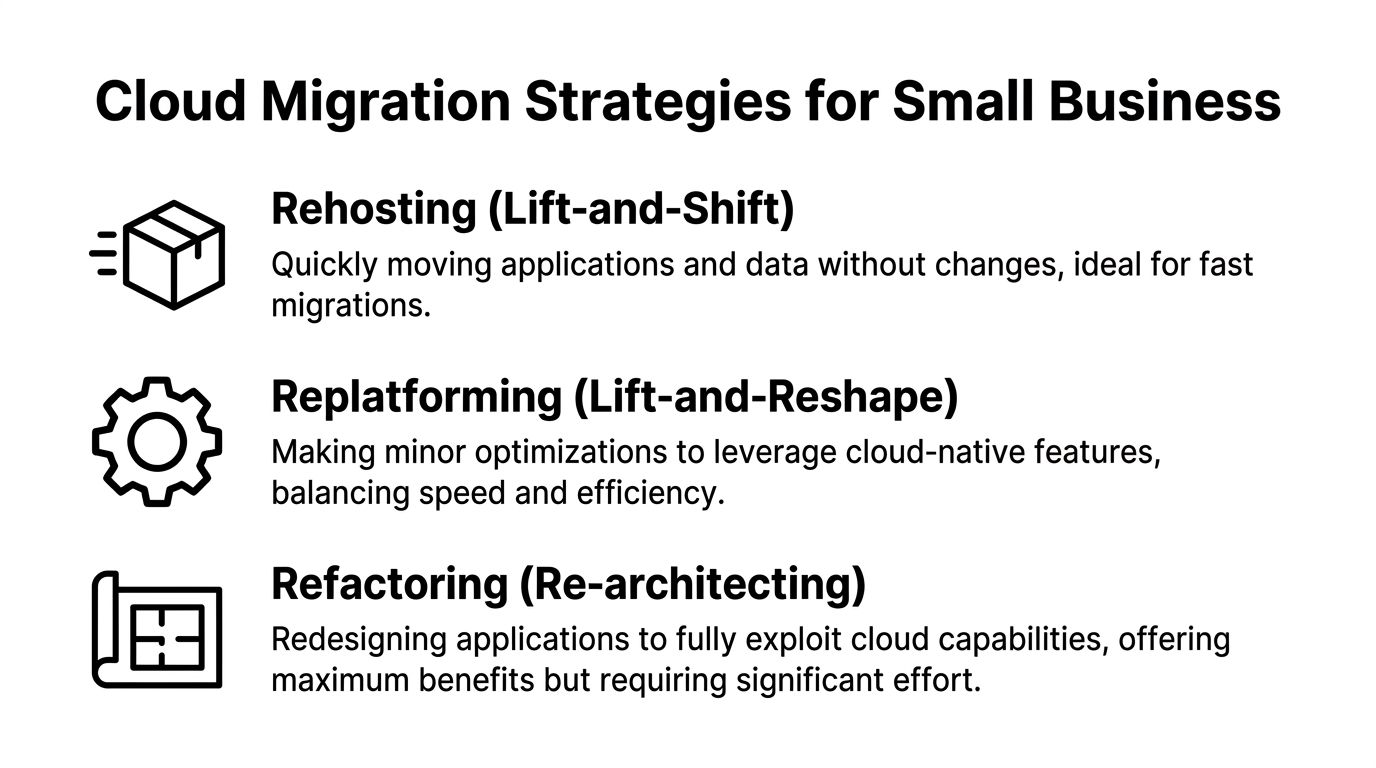
Three common paths
Rehosting is the classic lift-and-shift move. You take the application or server as it exists and move it into the cloud with minimal modification. This works well for legacy systems that need to get out of aging hardware fast.
Replatforming keeps the application largely intact but adjusts parts of the stack so you can use cloud-native services more effectively. You might move the app while changing the database layer, storage design, or runtime environment.
Refactoring changes the application itself. You redesign or rewrite it so it can take fuller advantage of the cloud. This makes sense for systems that are central to customer experience, growth, or long-term product delivery.
Choosing Your Migration Path Rehost vs. Replatform vs. Refactor
| Strategy | Description | Best For | Pros | Cons |
|---|---|---|---|---|
| Rehost | Move the workload with minimal changes | Legacy apps, urgent data center exit, low-risk first moves | Faster to execute, less redesign, lower disruption during migration | May carry old inefficiencies into the cloud |
| Replatform | Move the workload and optimize selected components | Stable apps that would benefit from managed databases, storage, or runtime updates | Better balance of speed and cloud efficiency | Requires more testing and compatibility review |
| Refactor | Redesign the application for cloud-native operation | Customer-facing platforms, growth-critical systems, applications with scaling or resilience issues | Stronger long-term flexibility, resilience, and modernization potential | Highest effort, more planning, larger change footprint |
What works in practice
A lot of small businesses overestimate how much of their estate needs refactoring on day one. Usually it is the opposite. A practical cloud migration for small business often starts with selective rehosting because it reduces infrastructure risk quickly.
A legacy accounting app is a good example. If the application is stable and users know how to operate it, rehosting can be the right first step. You reduce hardware dependency without introducing unnecessary application changes.
Replatforming fits the middle ground. Think of a reporting system that works, but struggles with backups, maintenance, or performance consistency. Moving it while shifting to managed database services or better storage architecture can improve operations without a full rebuild.
Refactoring should be reserved for systems where architecture is the constraint. If your customer portal cannot scale cleanly, or your operations depend on brittle batch jobs and manual interventions, redesign may be worth the effort.
Strategy mistakes to avoid
The common mistakes are predictable:
- Using rehosting for everything: Fast now, expensive later.
- Trying to refactor too early: Big ambition, little business tolerance for delay.
- Ignoring retention decisions: Some workloads belong in a hybrid model for operational or compliance reasons.
- Treating every app as equally important: They are not. Sequence by business impact.
Decision rule: Pick the least disruptive strategy that still solves the business problem in front of you.
If your team needs help deciding which workloads should be rehosted, replatformed, or redesigned, a cloud architecture review through Dr3am Cloud can be one way to compare cost, risk, and operational trade-offs before committing to a path.
Building a Phased Migration Execution Plan
The safest migration plan is rarely the fastest-looking one on paper. It is the one that controls blast radius.
A phased methodology has a much better track record than a single big cutover. A phased migration methodology yields an 85% success rate, compared to 55% for big-bang migrations, and it relies on pilot testing a non-critical workload and using real-time data replication tools to enable automatic failover and ensure zero downtime during cutover (SRS Networks).
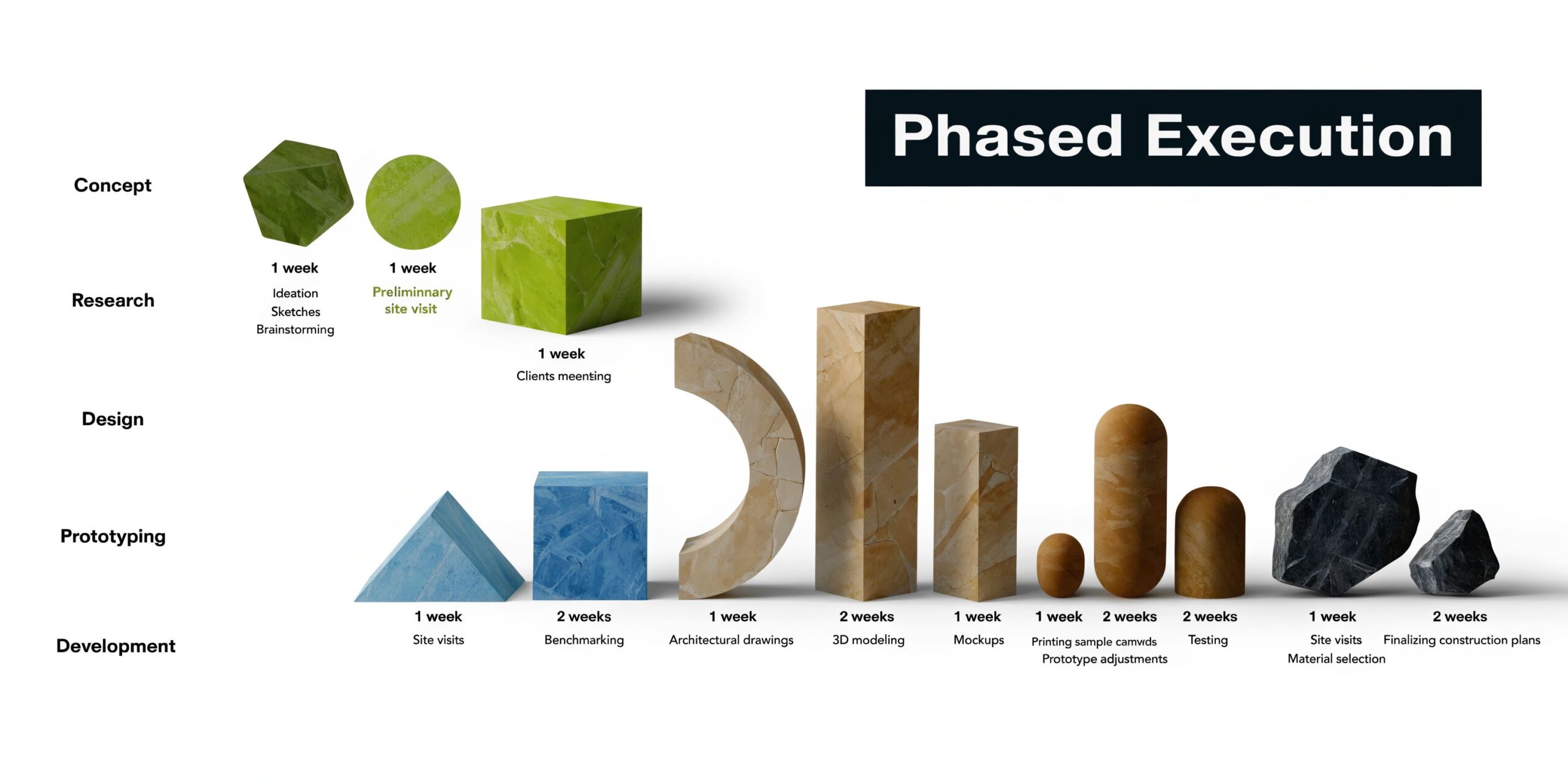
Phase one starts in a staging environment
Do not cut directly into production. Build a staging environment that mirrors the intended cloud setup closely enough to expose dependency issues, access gaps, and performance anomalies before users feel them.
That staging setup should include:
- Identity controls: Match roles, admin access, service accounts, and logging from the start.
- Networking and segmentation: Reproduce the access patterns the app needs, not broad open access.
- Monitoring: Configure CloudWatch or Prometheus before migration, not after.
- Backup and snapshot routines: Create rollback points you can restore.
The point of staging is not perfection. It is to catch expensive mistakes while the cost of fixing them is still low.
Pilot one non-critical workload
A non-critical pilot is not a symbolic exercise. It is where you validate your process.
Good pilot candidates include internal scheduling tools, low-risk file shares, small departmental apps, or reporting systems that are useful but not mission-critical during the cutover window. A methodology built from migration checklists recommends choosing one manageable workload, creating rollback snapshots, running migration tools such as AWS Database Migration Service in test mode, validating with scripts, and only then securing stakeholder sign-off.
A pilot answers practical questions fast:
- Are permissions mapping correctly?
- Does the app behave differently with cloud storage or new latency patterns?
- Does backup and restore work as expected?
- Can support teams troubleshoot in the new environment?
Move in waves, not all at once
Controlled waves are how you reduce business risk. The phased method recommends migrating 20% to 30% of workloads per wave. That keeps each cutover small enough to observe, validate, and correct before the next set moves.
A wave plan usually groups workloads by one of three models:
| Wave model | Best use | Risk profile |
|---|---|---|
| Business unit based | Departmental apps with clear ownership | Easier communication and support alignment |
| Dependency based | Applications with shared databases or service connections | Better technical control, more planning required |
| Complexity based | Start simple, then move harder systems later | Builds confidence and migration discipline |
For live systems, use replication tools such as Azure Site Recovery for synchronized data movement and automatic failover support where the use case fits. That reduces the cutover window and gives you a cleaner rollback posture.
Write the rollback plan before the migration runbook
Small businesses often document the migration sequence and treat rollback as a last-minute appendix. That is backwards.
Your rollback plan should specify where the latest snapshots are stored, who has authority to trigger rollback, what technical threshold causes that decision, and how staff and customers are notified if the migration is reversed. A good rollback plan is concrete, not optimistic.
Operator mindset: If you cannot explain how to reverse the cutover in plain language, you are not ready to execute it.
Execution discipline matters most when internal teams are already stretched. That is why many organizations hand the runbook, cutover coordination, monitoring setup, and rollback preparation to a managed migration partner. In practice, the firms that achieve zero-downtime transitions are the ones that rehearse, validate, and monitor each wave like an operations event, not a one-time file transfer.
Avoiding Critical Cloud Migration Pitfalls
Cloud projects rarely fail because the idea was wrong. They fail because the assumptions were loose.
40% of cloud migration projects exceed their budgets by 20% to 50%, 60% of SMB migrations suffer from misaligned business expectations, and 75% of SMBs cite expertise gaps as their top hurdle (CloudOptimo).

Misaligned expectations do damage early
A finance leader may expect lower monthly spend immediately. Operations may expect no process changes. IT may be aiming for platform modernization. All three goals can be valid, but if nobody reconciles them, the migration becomes a moving target.
Set the business case in plain terms. Decide whether this phase is about reducing hardware risk, improving resilience, enabling remote access, retiring technical debt, or preparing for application modernization. Then measure against that.
When expectations are vague, every trade-off feels like failure.
A rushed sequence creates avoidable outages
One of the most common execution mistakes is moving applications in the wrong order. Shared services, databases, authentication dependencies, and reporting jobs all need to be sequenced correctly. If they are not, the workload may technically migrate but still fail in production.
That is why a clear migration strategy matters more than a long task list. If a legacy document server can be moved with a rehost approach, do not force refactoring. If a custom portal depends on upstream services, do not migrate it before those services are stable.
Security gaps usually come from omissions
Most cloud security failures during migration are not exotic attacks. They are incomplete configurations, excessive permissions, weak credential hygiene, or unverified encryption settings.
Use a short security checklist before every cutover:
- Identity and access: Apply role-based access, review privileged accounts, and remove shared admin habits.
- Encryption: Protect data at rest and in transit with managed key options where appropriate.
- Logging and visibility: Turn on audit logging and alerting before users go live.
- Network controls: Limit exposure to only what the application requires.
- Recovery readiness: Confirm backup integrity and restoration steps in the target environment.
If your organization lacks a dedicated cloud security function, that gap should be addressed before production migration. Services such as Dr3am Security are designed for that layer of planning, control validation, and ongoing monitoring.
A short explainer like the one below can help non-technical stakeholders understand why migration mistakes often come from process, not just tools.
Training matters more than people admit
A migration can be technically clean and still feel rough if the support team does not know the new operating model. Admin consoles change. Escalation paths change. Troubleshooting steps change.
That does not mean every employee needs deep cloud expertise. It means the people responsible for support, security, and cost review need training aligned to the environment you built.
Practical rule: Migrate the workload only when the support model is ready to inherit it.
Post-Migration Optimization and Governance
Getting workloads into the cloud is only the midpoint. The return comes from what happens next.
A lot of small businesses assume the financial benefits appear automatically after cutover. In reality, cloud waste accumulates when nobody owns sizing, tagging, alerts, and monthly review. 75% of organizations face unexpected cloud bills due to poor sizing and lack of governance, some firms see costs increase by 20% to 30% post-migration, AI-driven optimization tools can deliver 25% to 40% savings, and adoption among SMBs remains below 15% (Networks Unlimited).

Governance starts with visibility
You cannot optimize what you cannot see. Every cloud environment should have a baseline governance model from the first month in production.
That includes:
- Budget ownership: Someone reviews monthly spend and can question changes.
- Tagging standards: Resources are labeled by application, environment, owner, and business unit.
- Access review: Permissions are revisited as teams and vendors change.
- Change control: Teams know who approves new resources and architecture shifts.
- Policy enforcement: Security and compliance settings are monitored continuously, not checked once.
For leaders who need a broader operating lens, this overview of Governance, Risk, and Compliance (GRC) strategy is useful because it frames cloud oversight as part of business governance, not just technical housekeeping.
Optimize around actual usage
The biggest post-migration waste usually comes from over-provisioning. Teams size for peak fear, not measured demand. The result is idle compute, oversized storage classes, and resources left running when nobody uses them.
Good optimization work is repetitive by design:
| Optimization area | What to review | What good looks like |
|---|---|---|
| Compute sizing | CPU, memory, utilization trends | Instances reflect real demand, not guesswork |
| Auto-scaling | Thresholds and schedules | Capacity expands and contracts with workload patterns |
| Storage tiers | Access frequency and retention | Data sits in the right class for performance and cost |
| Reserved commitments | Stable baseline usage | Predictable workloads use lower-cost commitment options |
| Alerting | Spend and anomaly notifications | Teams know about spikes before invoices arrive |
The phased migration methodology recommends using AWS Cost Explorer for monthly cost reviews and setting auto-scaling groups around target CPU utilization in the 60% to 70% range. Those habits keep spend closer to workload reality.
Managed support is often the missing layer
This is the part many SMBs underestimate. They can complete the migration project, but they do not have the bench to govern and tune the environment every month after launch.
That is where managed services become less of a convenience and more of a control mechanism. A provider can watch spend patterns, adjust scaling policies, harden configurations, maintain visibility, and keep cloud operations aligned with business priorities while internal teams focus on customers and core operations. Dr3amsystems offers that combination through its cloud, AI, hosting, and managed support practices, including secure migration execution, post-cutover monitoring, and ongoing optimization.
Key takeaway: If nobody owns post-migration governance, the cloud becomes a billing model instead of a business advantage.
Optimization should include people, not just platforms
Cloud maturity also depends on how your staff works in the new environment. Teams should know where to find usage dashboards, how to request resources, how to escalate incidents, and how to recognize waste before it turns into recurring spend.
The strongest operating model is simple. Technical controls are automated where possible. Financial oversight is visible. Security review is continuous. Support responsibilities are documented. That is what turns a successful migration into a durable cloud platform.
Your Next Steps to a Successful Cloud Journey
Cloud migration for small business works when leaders treat it as a controlled business transition, not a one-weekend infrastructure move. The sequence matters. Start with a readiness assessment. Choose the right migration strategy per workload. Execute in phases. Protect the rollout by avoiding predictable mistakes. Then stay disciplined after cutover with governance and optimization.
The hardest part for most small businesses is not deciding to move. It is knowing who should design the target state, validate compatibility, build the runbook, watch the cutover, secure the environment, and manage the cloud once the project team goes back to regular work.
If your internal team is thin, that is not a reason to delay forever. It is a reason to structure the project realistically and get expert help where the risk is highest. A practical first step is to map your current systems, rank workloads by business impact, and define what success means before any migration window is scheduled.
For organizations that want help across planning, migration, support, and optimization, the full set of capabilities is available through Dr3amsystems services.
A good cloud move should reduce operational friction, strengthen resilience, and give your team better control over systems and spend. If you want a customized roadmap before making that commitment, schedule a free consultation with Dr3amsystems to review your current environment, identify migration risks, and define a practical path to a secure, low-disruption transition.